As Amazon Associates, we earn from qualifying purchases. This means we may receive a small commission at no extra cost to you if you click through and make a purchase.

Standard consumer 3D printers often present a steep wall of friction, requiring manual bed tramming, complex slicer settings, nozzle temperature tweaking, and constant mechanical troubleshooting. For parents, educators, and young creators, these technical hurdles quickly turn what should be an exciting educational project into a source of domestic frustration. Families searching for the Toybox 3D Printer bundle want a zero-headache digital fabrication appliance that allows children to bring ideas into the physical world without constant adult supervision or mechanical intervention.
Our assessment of this deluxe kit indicates that it fulfills its core promise by trading away the intimidating complexity of open-frame hobbyist gear in favor of an intuitive, walled-garden digital toy catalog. With eight included spools of non-toxic PLA, one-touch execution, and automated calibration, this toy box 3d printer deluxe bundle provides an exceptionally reliable, safe, and autonomous pathway for children to master modern making.
01 Quick Verdict
The Toybox system successfully bridges the gap between complicated additive manufacturing machinery and child-friendly consumer electronics by automating the entire printing pipeline from design selection to finished part.
- Integrated tool-free calibration and single-touch commands eliminate the traditional initial configuration headaches of budget 3D printing.
- The package includes eight multi-colored PLA filament spools, supplying sufficient non-toxic material for dozens of immediate prints right out of the box.
- A digital library featuring over 10,000 ready-to-print toys, including licensed characters from SpongeBob and Batman, removes the requirement to learn third-party slicing software.
- The lightweight, enclosed frame and kid-safe engineering provide peace of mind during operation on ordinary home desks.
02 Toybox 3D Printer Features Explained
01 Companion Toybox App and Extensive Digital Toy Library
The central engine driving the usability of this machine is the specialized toybox app 3d printer interface, which is compatible across iOS, Android, and web platforms. Rather than forcing users into professional CAD drafting or third-party slicing engines, the mobile software operates as an intuitive, visual toy store where children simply select an item and send it wirelessly to print. The catalog spans more than 10,000 digital objects, including officially licensed figures from popular franchises such as Batman, SpongeBob, and How to Train Your Dragon.
For young makers looking to expand beyond pre-made figurines, the app also includes built-in digital drawing tools that convert spontaneous sketches into three-dimensional plastic objects. As explored in our 3d printer kids toybox overview, having native support for standard STL, OBJ, and gCode file formats ensures the hardware remains useful as kids progress toward advanced design software.
02 Alpha Three Hardware Upgrades for Speed and Precision
In this toybox alpha three review, the mechanical enhancements over prior iterations represent a marked improvement in day-to-day operation. The listing specifies that the Alpha Three architecture prints up to twice as fast while delivering 50 percent more fine detail compared to the previous Alpha Two baseline. Speed is a vital consideration when evaluating a toybox 3d printer for kids, because lengthy multi-hour wait times often erode a young child’s attention and enthusiasm for the technology.
By refining the movement axes and hotend throughput, the machine lays down consistent PLA layers that minimize surface banding and stringing. While older machines frequently experienced nozzle jams or uneven cooling, readers familiar with our evaluation of the original toybox alpha 3d printer will appreciate how these updated tolerances produce smooth, cleanly articulated miniature action figures, wearable rings, and desk accessories.
03 Kid-Safe Construction and Clean PLA Chemistry
Physical safety is a primary consideration whenever automated thermal machinery is brought into a bedroom or family playroom. This toybox safe 3d printer addresses safety concerns by utilizing a compact, lightweight, and durable frame designed to minimize pinch points and shield curious fingers from high-temperature mechanical components during operation.
Material selection is equally crucial for home safety. The bundle utilizes exclusively non-toxic PLA (polylactic acid), an environmentally sound bioplastic that produces mild, sweet-smelling vapor rather than the noxious chemical fumes associated with industrial filaments like ABS or nylon. This makes the unit completely safe to run in closed interior rooms without dedicated ventilation systems or external filtration hoods.
04 One-Touch Printing and Tool-Free Calibration
The most demanding aspect of traditional additive manufacturing has always been bed leveling, nozzle z-offset tuning, and belt tensioning. The toybox 3d printer setup entirely bypasses these manual calibration chores through automated internal routines and tool-free calibration right out of the box.
A child or beginner simply unboxes the chassis, plugs in the power cord, drops a filament spool into place, and launches the companion application. From that moment, sending a model to print requires a single tap on the screen, letting children experience immediate creative success without adult technical intervention or complicated manuals.
05 Multi-Printer Management and Generous Filament Bundle
The included toybox 3d printer filament bundle provides eight distinct, multi-colored PLA spools, solving the common disappointment of running out of starter material on the first afternoon. Having an assortment of vivid colors encourages kids to experiment with varied aesthetic designs, decorative desk toys, and multi-part assembled projects without making an immediate follow-up supply purchase.
Furthermore, the system features integrated multi-printer support directly through the centralized cloud account. In classrooms, maker clubs, or homes with multiple siblings sharing different printers, an administrator can monitor, dispatch, and manage print jobs across multiple Toybox units from a single smartphone or tablet dashboard without encountering device connection conflicts.
03 Specs
Review the verified toybox 3d printer specs in the table below to evaluate its physical capabilities and system requirements.
| Attribute | Detail |
|---|---|
| Brand | Toybox |
| Hardware Generation | Alpha Three |
| Supported Filament Material | PLA (8 multi-colored spools included) |
| Calibration Mechanism | Tool-free automated calibration |
| Compatible Client Devices | Laptop, Personal Computer, Smartphone |
| Supported Operating Systems | Windows, macOS, iOS, Android, Web |
| Supported File Formats | STL, OBJ, GCODE |
| Digital Toy Library Capacity | 10,000+ ready-to-print designs and licensed characters |
| Build Volume Dimensions | The listing does not specify |
| Connectivity Options | The listing does not specify |
04 Toybox 3D Printer Pros and Cons
Pros
- Automated tool-free calibration
- Includes 8 multi-colored PLA spools
- Over 10,000 ready-to-print digital designs
- Safe lightweight kid-friendly chassis
- Alpha Three prints twice as fast
Cons
- Build volume dimensions not specified
- Limited strictly to PLA filament
- Not built for large mechanical parts
05 Best Use Cases
- Introducing elementary and middle school children to digital design concepts without forcing them to learn manual slicer settings.
- Fabricating officially licensed figurines, collectible accessories, and miniature action figures directly from a handheld tablet.
- Encouraging artistic experimentation by converting a child’s freehand digital sketches into tactile plastic keepsakes.
- Providing an approachable, low-maintenance additive manufacturing station for elementary school classrooms and library maker corners.
- Supplying a completely autonomous, plug-and-play crafting appliance that children can safely operate on rainy weekends.
06 Before You Buy
Before purchasing this easy 3d printer for beginners, buyers must understand the scope of its intended operating environment. The system functions smoothly across desktop computers running macOS or Windows, as well as iOS and Android mobile phones and tablets. The integrated support for raw STL, OBJ, and gCode files ensures the hardware is not strictly limited to its proprietary catalog. However, the listing does not specify the precise print volume dimensions, maximum hotend extrusion temperature, or the physical spool spindle diameter, meaning users should assume the build area is optimized for compact desk toys rather than large mechanical assemblies.
Prospective buyers should also examine how this automated printer differs from manual fabrication tools. As discussed in our review of the myfirst 3doodler start+ 3d pen bundle, handheld extrusion pens require physical dexterity and manual shaping, whereas the Toybox uses precision motor-driven axes to reproduce digital files flawlessly. Note that the listing does not specify whether the package includes replacement nozzles, platform adhesion glue, or print removal scraper tools, so owners should treat the included eight-spool toybox 3d printer bundle as a dedicated material package rather than an extensive hardware maintenance toolkit.
07 How It Compares With Similar Picks
Compare the features and practical focus of the Toybox against other machines identified in this category.
| Product | Best For | Key Difference |
|---|---|---|
| Toybox 3D Printer | Kids, families, and zero-friction toy fabrication | Curated 10,000+ toy app ecosystem, tool-free calibration, and 8 PLA spools included |
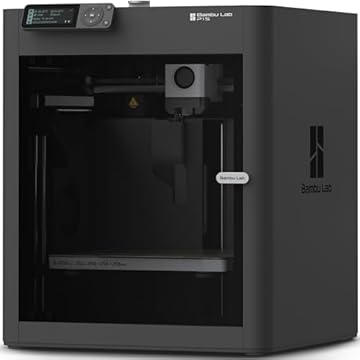
| MakerWorld Model Library | Enthusiasts demanding multi-color industrial speed | Bambu Lab P1S Combo platform featuring an AMS multi-material feeder and enclosed CoreXY motion |
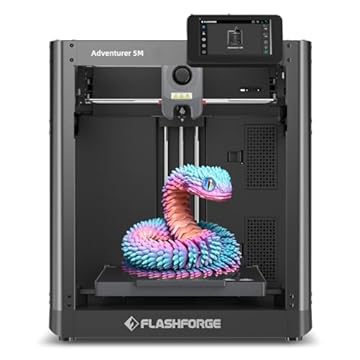
| FLASHFORGE Adventurer 5M 3D Printer | Rapid prototyping and functional domestic prints | 600mm/s CoreXY speed, 280°C direct extruder, and a large 220x220x220mm build chamber |
| Beginner-Friendly Ecosystem with MakerWorld Model | Makers seeking an enclosed high-precision platform | Enclosed CoreXY Bambu Lab P1S standalone architecture paired with the MakerWorld repository |
Choose an alternative like the Bambu Lab P1S or Flashforge Adventurer 5M if your household contains older teens or adults interested in mechanical engineering, functional bracket printing, or high-temperature structural plastics. Our analysis of the creality k2 se 3d printer shows that larger open-format printers deliver expansive build plates and blistering industrial speeds, but they demand technical comfort with mechanical slicers. The Toybox remains the superior pick when child autonomy, digital safety, and zero setup frustration take priority over raw technical capability.

08 Bottom Line
Deciding whether is toybox 3d printer worth it ultimately comes down to who will be pressing the buttons. If you are a hobbyist looking to print functional automotive brackets or full-sized cosplay helmets, this unit’s compact focus will feel limiting. But if your goal is to introduce children to additive manufacturing through an inviting, self-contained appliance that never requires an adult to spend Saturday morning troubleshooting firmware or bed level offsets, this package represents an outstanding family investment.
By pairing the refined Alpha Three hardware with eight vibrant PLA spools and a library of over 10,000 recognizable models, the Toybox 3D Printer delivers an unmatched, turn-key creative experience that empowers young makers from the moment the box is opened.
09 FAQ
Can children operate the Toybox 3D Printer without adult help?
Yes. The system is engineered specifically for child autonomy, featuring tool-free automated calibration, kid-safe frame construction, non-toxic PLA materials, and an intuitive mobile app that allows kids to select and start prints with a single tap.
What materials work with the Toybox 3D Printer?
The printer is designed to run exclusively on non-toxic PLA filament. The deluxe package includes an eight-spool multi-colored PLA bundle, providing a safe, clean, and low-odor printing environment suitable for domestic play areas.
Can you print custom designs or only the toys inside the app?
You can print both. In addition to the curated library of over 10,000 toys and licensed characters, the Toybox app features an integrated drawing tool and allows users to import standard STL, OBJ, and gCode files for custom creations.
How does the Alpha Three perform compared to older Toybox versions?
According to the product specifications, the Alpha Three print mechanism operates up to two times faster and produces 50 percent more detail than the earlier Alpha Two model, noticeably reducing waiting times for completed prints.
What operating systems and devices are supported?
The Toybox ecosystem supports personal computers running Windows and macOS, as well as smartphones and tablets running iOS and Android, alongside browser-based web access.