As Amazon Associates, we earn from qualifying purchases. This means we may receive a small commission at no extra cost to you if you click through and make a purchase.

For busy parents who want to introduce modern technology into their home without acquiring an exhausting technical side hobby, buying the right hardware can be a minefield. Standard desktop fabricators often require endless manual tinkering, mechanical calibration, complex slicer configurations, and careful temperature management that simply do not suit young children or working households. The Toybox 3D Printer directly tackles this frustration by delivering an appliance-style, closed-loop creative experience designed from the ground up for children and non-technical families. Instead of forcing parents to learn industrial design software or manually level print surfaces, this dedicated 3d printer kids toybox solution focuses entirely on autonomy, turning digital catalogs into physical objects with minimal barrier to entry.
Our verdict is clear: if your primary objective is giving children an engaging, self-directed digital manufacturing tool that minimizes adult intervention and software troubleshooting, this machine stands out as one of the most accessible options available. While serious hobbyists will find its streamlined controls and enclosed ecosystem limiting compared to open-ended desktop machines, families looking for immediate creative gratification will find that the thoughtfully engineered companion software and child-friendly safety choices deliver genuine peace of mind.
01 Quick Verdict
The Alpha Three edition of the Toybox platform succeeds by eliminating traditional desktop 3D printing hurdles through an app-driven experience that children can comfortably operate under basic household supervision. It removes the intimidation factor of traditional computer numerical control equipment, substituting complicated mechanical adjustments with an intuitive digital toy catalog and push-button operation.
- Streamlined digital ecosystem with one-touch operation that lets kids print toys directly from a mobile device or browser.
- Engineered for household safety with non-toxic PLA materials and a lightweight, child-friendly chassis.
- Substantial performance leap over earlier generations, offering double the print speed and improved fine detail.
- Includes eight distinct spools of printing material straight out of the box so families can begin fabricating projects immediately.
02 Toybox 3D Printer Features Explained
01 One-Touch Printing and Tool-Free Calibration
Traditional manufacturing hardware often requires manual leveling screws, feeler gauges, and tedious bed adjustments before every single build. The Toybox one touch printing philosophy eliminates this steep barrier by incorporating tool-free calibration right out of the box. Children do not need to grasp mechanical tolerances or mechanical z-axis offsets; instead, the device automates initial alignment so youngsters can pick an item and start building with minimal preliminary setup.
This automated foundation makes the overall toybox 3d printer setup exceptionally friendly for non-technical guardians. Rather than spending evening hours debugging adhesion issues or troubleshooting bed leveling screws, parents can connect the hardware to their home network, walk through the guided software instructions, and allow their children to select a model without needing mechanical intervention.
02 Kid-Safe Construction and Non-Toxic PLA Material
Safety remains the chief concern for any parent introducing additive manufacturing into a playroom or living room. The platform addresses household hazards by utilizing a lightweight, durable frame engineered to handle active environments while restricting access to moving parts. As a purpose-built safe 3d printer for kids, the mechanical footprint minimizes open pinch points and keeps operation approachable for elementary and middle schoolers.
Material safety is equally vital when fabricating items for younger users. The unit runs exclusively on non-toxic PLA, a cornstarch-derived thermoplastic that prints cleanly without the harsh fumes, acrid odors, or hazardous chemical off-gassing common with ABS or industrial nylon filaments. For families looking into the broader lineup, our evaluation of the toybox alpha 3d printer series highlights how this material-first safety approach ensures worry-free indoor operation around children and pets.
03 The Toybox Digital Ecosystem and Licensed Toy Library
Hardware represents only half of the 3D printing equation; software usability typically determines whether a machine gets used daily or ends up abandoned in a storage closet. The free toybox 3d printer app, available across iOS, Android, and standard web browsers, serves as an expansive digital storefront and creative sandbox. The platform hosts a curated library of more than 10,000 ready-to-print toys, meaning kids never have to hunt through obscure online repository websites or run complex slicing utilities to start a project.
A major draw of this digital toy catalog is its official licensing partnerships, featuring beloved characters from entertainment franchises such as SpongeBob SquarePants, DC Comics Batman, and How to Train Your Dragon. Children can browse character action figures, small vehicles, modular bricks, and wearable rings directly within the app, tapping a single button to transmit the print job wirelessly. For older or more creative kids who want to expand beyond pre-made designs, the application also includes built-in drawing tools that transform two-dimensional finger sketches into physical three-dimensional objects.
04 Alpha Three Performance and Detail Enhancement
In this toybox alpha three review assessment, hardware speed and visual fidelity represent the most noteworthy mechanical leaps. The Alpha Three iteration prints up to two times faster than the previous Alpha Two iteration while delivering 50 percent greater visual detail. This speed boost is crucial for younger makers whose patience runs thin during multi-hour manufacturing cycles, turning waiting periods into practical after-school activities.
The improved mechanical precision translates directly into crisper overhangs, cleaner surface definition, and better interlocking tolerances on articulated items. While the listing does not specify the exact micron layer height or travel speeds in millimeters per second, the visual refinement ensures that small facial features on action figures and miniature gears on interactive toys come out cleanly defined rather than blobby or deformed.
05 Multi-Printer Management and Open File Compatibility
While designed primarily around its proprietary, child-safe ecosystem, the printer does not lock advanced users completely out of standard 3D design workflows. The platform natively accepts standard STL, OBJ, and pre-compiled GCODE files uploaded through the web portal or companion application. This file versatility allows curious students learning basic computer-aided design in school programs or online modeling suites to export their custom geometry and print it directly on their home machine.
For educational classrooms, homeschool co-ops, or households with multiple siblings who want dedicated printing stations, the software includes built-in multi-printer management. Parents or instructors can connect and oversee multiple Toybox units from a single administrative account on their computer or smartphone, routing jobs to idle printers across the house without needing separate software accounts or switching hardware cords.
03 Specs
Reviewing the published toybox 3d printer specs provides a clear picture of its system requirements, material compatibilities, and platform constraints before making an investment.
| Attribute | Detail |
|---|---|
| Brand | Toybox |
| Model Generation | Alpha Three |
| Compatible Material | PLA |
| Included Consumables | 8 Multi-Colored PLA Filament Spools |
| Supported File Formats | STL, OBJ, GCODE |
| Supported Desktop Operating Systems | Windows, macOS |
| Supported Mobile Platforms | iOS, Android, Web Browser |
| Compatible Hardware Devices | Laptop, Personal Computer, Smartphone |
| Calibration Mechanism | Tool-Free Calibration |
| Build Volume Dimensions | The listing does not specify |
04 Toybox 3D Printer Pros and Cons
Pros
- Tool-free calibration and one-touch printing
- Curated catalog with over 10,000 toys
- Non-toxic PLA filament safe for children
- Includes eight colorful filament spools
- Double the print speed of previous generation
Cons
- Restricted to PLA filament materials
- Build volume not specified in listing
- App-centric ecosystem limits advanced slicing controls
05 Best Use Cases
- Introducing elementary and middle school students to computer-aided manufacturing without overwhelming them with slicer settings.
- Independent toy fabrication where children can choose, customize, and print licensed character models safely on their own.
- Homeschool and STEM enrichment activities that teach simple prototyping, geometric spatial awareness, and additive design concepts.
- Multi-child households where parents need a managed, app-controlled creative workstation that can coordinate multiple printers.
06 Before You Buy
Before bringing this system home, parents should evaluate device compatibility, physical materials, and operational parameters. The printer interfaces seamlessly with smartphones running iOS or Android, as well as desktop and laptop workstations operating Windows or macOS. In terms of consumables, this specific bundle package comes equipped with eight multi-colored spools of toybox 3d printer filament, providing an abundant starting reservoir of non-toxic PLA. Parents seeking different accessories or extended component sets can also compare this kit against the toy box 3d printer deluxe bundle to see which bundled arrangement fits their budget and planned project scale.
It is equally important to note the technical boundaries and unstated specifications on the manufacturer listing. The listing does not specify the exact cubic build volume dimensions, maximum hotend temperatures, heated bed capabilities, or physical chassis weight. Because this machine is formulated specifically around safe PLA extrusion, users should not expect to print advanced engineering materials like ABS, ASA, TPU, or nylon. Furthermore, while the software supports standard STL, OBJ, and GCODE uploads, the platform is designed primarily around small-format toys rather than massive functional mechanical parts.
07 How It Compares With Similar Picks
| Product | Best For | Key Difference |
|---|---|---|
| Toybox 3D Printer | Young children and busy families wanting plug-and-play toy making | Curated child-safe ecosystem, one-touch mobile catalog, and 8 included PLA spools |
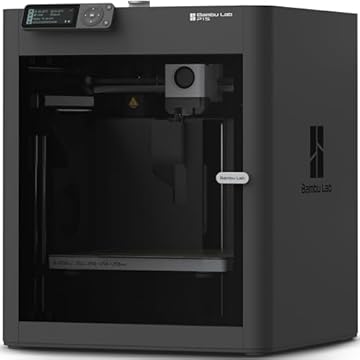
| MakerWorld Model Library | Advanced hobbyists wanting automated multi-color CoreXY printing | Includes AMS multi-color unit, high-speed CoreXY chassis, and Bambu Lab P1S architecture |
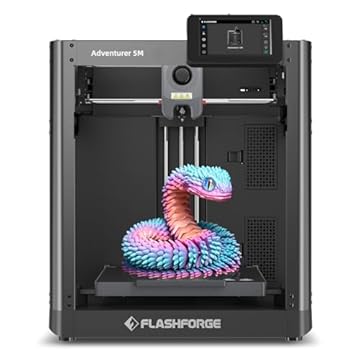
| FLASHFORGE Adventurer 5M 3D Printer | Makers needing high-temperature extrusion and rapid large-scale prototyping | Features a 280°C direct extruder, 3S detachable nozzle, and a large 220x220x220mm build volume |
| Beginner-Friendly Ecosystem with MakerWorld Model | Users seeking an enclosed CoreXY high-speed desktop fabrication workshop | Fully enclosed P1S frame supporting advanced desktop FDM workflows and MakerWorld integration |
Choosing between these platforms comes down to the user’s technical appetite and intended age group. If you are an experienced hobbyist looking for larger build envelopes, high-temperature filaments, and multi-color extrusion arrays, modern desktop platforms such as the bambu a1 3d printer or the high-speed Bambu Lab P1S CoreXY variants provide significantly higher mechanical ceilings and broader material versatility. However, those open-ended machines require active adult oversight, slicing software knowledge, and careful safety management around higher temperature extruders. If your priority is an autonomous toy-making appliance that elementary kids can operate from an iPad without constant parental rescue missions, the Toybox platform remains far more appropriate.
08 Bottom Line
The central question for busy parents is whether the investment translates into sustained educational entertainment or technical frustration. When asking is toybox 3d printer worth it, the answer depends on how much you value your own time. By packaging tool-free calibration, non-toxic PLA materials, and an expansive 10,000-model library into an app-driven platform, Toybox has removed the technical hurdles that typically turn desktop fabrication into an adult-only chore.
This toybox 3d printer for kids hits the sweet spot for elementary and middle schoolers who want immediate gratification from their creative efforts. With eight included filament spools, official pop-culture licensed toys, and reliable one-touch operation, the Alpha Three delivers an accessible, safe, and genuinely autonomous introduction to digital fabrication for modern households.
09 FAQ
Can children operate the Toybox 3D Printer without adult help?
Yes, the platform is intentionally engineered with one-touch controls and tool-free calibration so children can independently select toys from the mobile app and start prints. However, basic adult guidance is recommended during unboxing, home wireless network setup, and initial spool loading.
What types of filament does this printer support?
The printer is designed to run non-toxic PLA filament, which prints safely indoors without toxic vapors or acrid fumes. This bundle comes supplied with eight multi-colored PLA spools, though the listing does not specify compatibility with high-temperature materials or other specialty filament blends.
Can my child print their own original designs or only catalog toys?
Children can print custom models by utilizing the drawing functions within the companion mobile application to turn 2D sketches into 3D items. In addition, older creators can upload their own standard STL, OBJ, or GCODE design files through the companion software.
What operating systems and devices are compatible with the software?
The free software platform supports laptops, personal computers, and mobile smartphones across Windows and macOS desktop operating systems, as well as iOS, Android, and modern web browsers.
How does the Alpha Three model compare to the Alpha Two?
According to the manufacturer specifications, the Alpha Three edition prints up to two times faster and yields 50 percent more detail than the previous Alpha Two iteration, resulting in faster print completions and cleaner visual definition.
Does the printer come with a heated build plate or enclosure?
The listing does not specify whether the build platform is heated or what surface material it uses, nor does it detail a fully sealed enclosure. It emphasizes a safe, lightweight, child-friendly chassis optimized for PLA printing.