As Amazon Associates, we earn from qualifying purchases. This means we may receive a small commission at no extra cost to you if you click through and make a purchase.

Setting up consumer 3D printing equipment in a home environment has historically demanded technical troubleshooting, bed tramming, and slicer configuration before producing a single successful model. For time-poor parents who want to introduce STEM concepts without managing mechanical errors, failed prints and complicated software create an immediate barrier. The Toybox Alpha addresses this problem by replacing complex slicers and manual adjustments with a streamlined, app-driven ecosystem tailored for young makers. In this toybox 3d printer review, we evaluate whether this compact machine delivers effortless, plug-and-play fabrication for busy households.
Our verdict is that this device successfully provides a reliable, zero-friction introduction to 3D printing for children and novices. By utilizing non-toxic PLA filament, one-touch mobile controls, and a vast digital toy library, it eliminates the typical hurdles of desktop additive manufacturing. Advanced makers seeking high-temperature materials or massive build volumes will find it intentionally bounded, but families looking for turnkey digital fabrication will find that it excels at its core mission.
01 Quick Verdict
The Toybox Alpha delivers an ultra-accessible, child-friendly 3D printing experience that removes mechanical friction in favor of one-touch digital crafting.
- Tool-free calibration and one-touch printing simplify operation for beginners
- Extensive companion library includes over 10,000 digital toys and licensed characters
- Lightweight frame and non-toxic PLA filament provide a safe home environment
- Restricted material compatibility and unlisted build volume limit advanced technical use
02 Toybox Alpha Features Explained
01 Tool-Free Calibration and Easy Setup
Traditional desktop printers require tedious manual leveling with paper gauges, belt tightening, and nozzle height offsets. The toybox 3d printer setup removes these mechanical obstacles through automated, tool-free calibration that works right out of the box. Users do not need to assemble stepper motors, align axis rails, or adjust bed screws before starting their first job.
Once connected to a mobile device, the one-touch printing system automatically handles nozzle positioning and filament feed rates. This pre-calibrated framework prevents first-layer adhesion failures, letting children initiate printing independently without adult troubleshooting.
02 Companion Software and Digital Catalog
Rather than requiring users to learn technical slicing programs, toybox app 3d printing operates through a streamlined interface available on iOS, Android, and web platforms. The application functions as an all-in-one control center and digital repository, housing more than 10,000 ready-to-print toys, miniatures, and interactive items.
As discussed in our broader 3d printer kids toybox analysis, having curated digital models guarantees that prints have printable overhangs and proper base geometry. The app also features drawing functionality that lets kids convert simple digital sketches into three-dimensional plastic objects with a single tap.
03 Safe Frame Architecture and Materials
Child safety is a major consideration when bringing heated manufacturing tools into family spaces. The toybox alpha safety features center on an enclosed, durable chassis weighing 14.97 pounds, engineered with smooth edges to minimize mechanical pinch hazards. The unit measures 11.02 inches deep, 11.02 inches wide, and 8.27 inches high, providing a compact footprint that fits neatly on a bedroom desk or playroom shelf.
Operational safety is further reinforced by relying strictly on non-toxic polylactic acid (PLA). PLA is derived from renewable resources like corn starch, melting at modest temperatures without releasing the acrid fumes or micro-particles common to industrial filaments like ABS. This makes the Toybox Alpha for kids a worry-free choice for enclosed home spaces.
04 Licensed Character Catalog
A distinctive feature of the Toybox ecosystem is its official licensing agreements with major entertainment franchises, allowing users to print recognizable characters directly from the companion app. Children can fabricate official designs from SpongeBob SquarePants, Batman, and How to Train Your Dragon using the included spool.
The printer bundle includes a one-month trial of the Toybox Plus membership, unlocking curated premium models and advanced collectibles. While thousands of free models remain permanently available, the premium subscription introduces rotating specialty toys that keep young users engaged long after initial setup.
05 Custom Digital File Support
Although the platform focuses primarily on its curated catalog, it does not prevent users from manufacturing independent designs. The Toybox companion app and web interface support external uploads in standard STL, OBJ, and gCode file formats.
This capability provides a clear educational runway as children progress beyond pre-made toys. Students can create custom parts in beginner modeling software like Tinkercad, export the STL file, and print it seamlessly through the Toybox system without managing complex slicer variables.
03 Specs
| Specification | Detail |
|---|---|
| Brand | Toybox |
| Manufacturer | Toybox |
| Model Number | PR_alpha20_sams |
| Product Dimensions | 11.02″D x 11.02″W x 8.27″H |
| Item Weight | 14.97 pounds |
| Supported Material | Polylactic Acid (PLA) |
| Compatible Devices | Smartphone (iOS, Android, Web) |
| Supported File Formats | STL (app also supports OBJ and gCode) |
| Calibration | Tool-free calibration |
| Included in Box | Toybox 3D Printer, 1 PLA filament spool, 1-month Toybox Plus trial |
04 Toybox Alpha Pros and Cons
Pros
- Tool-free calibration and one-touch mobile printing
- Library of over 10,000 digital toy designs
- Officially licensed character models included
- Non-toxic PLA filament included in box
- Compact and lightweight 14.97-pound child-safe frame
Cons
- Restricted strictly to Polylactic Acid filament
- Maximum build volume dimensions not specified in listing
- Premium toy designs require ongoing paid membership
05 Best Use Cases
- Introducing elementary and middle school students to additive digital fabrication without technical friction.
- Printing custom action figures, licensed cartoon characters, and board game pieces on demand.
- Completing visual school STEM projects and transforming hand-drawn digital sketches into tangible objects.
- Providing clean, odor-free desktop 3D printing in shared family living spaces and children’s study areas.
06 Before You Buy
Before purchasing, buyers must evaluate toybox alpha filament compatibility. The printer is designed specifically to extrude Polylactic Acid (PLA), and the listing does not indicate support for high-temperature materials like PETG, ABS, or flexible TPU. Although one spool of PLA is included in the package, the listing does not specify the spool weight or confirm whether standard third-party spool dimensions fit on the unit without modifications. Parents considering package variations can review our overview of the toy box 3d printer deluxe bundle to see how accessory offerings differ.
It is also essential to note the technical details that the listing does not specify. While external dimensions are stated at 11.02 by 11.02 by 8.27 inches, the listing does not specify the maximum printable build volume, nozzle diameter, maximum nozzle temperature, or print speed in millimeters per second. Furthermore, while the one-month trial grants access to Toybox Plus originals, maintaining access to that premium catalog tier requires an ongoing paid subscription once the initial trial period expires.
07 How It Compares With Similar Picks
| Product | Best For | Key Difference |
|---|---|---|
| Toybox Alpha | Children and beginners wanting zero-tinker toy printing | Curated 10,000+ model toy catalog, child-safe design, and one-touch app printing |
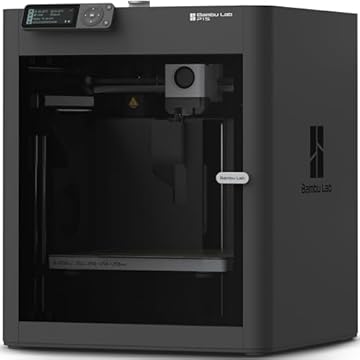
| MakerWorld Model Library | Intermediate hobbyists needing automated multi-color production | CoreXY Bambu Lab P1S Combo platform featuring AMS multi-color filament feeding |
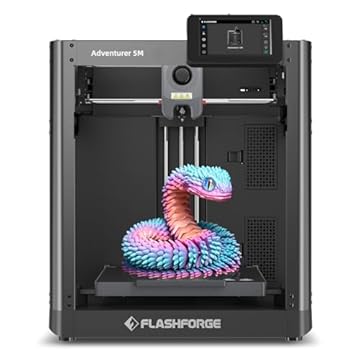
| FLASHFORGE Adventurer 5M 3D Printer | High-speed engineering prints and high-temperature filaments | 600mm/s speed, 280°C direct extruder, and a large 220x220x220mm build size |
| Beginner-Friendly Ecosystem with MakerWorld Model | Makers focused on high-precision CoreXY engineering parts | Enclosed Bambu Lab P1S standalone architecture built for fast, technical fabrication |
When comparing the Toybox Alpha vs Bambu Lab P1S systems, such as the MakerWorld Model Library combo or the standalone Beginner-Friendly Ecosystem with MakerWorld Model, the operational focus is fundamentally different. The Bambu Lab P1S units provide high-speed CoreXY mechanics, auto bed leveling, and advanced multi-color printing via the AMS system, catering to enthusiasts who require functional engineering parts and higher build speeds. Meanwhile, the FLASHFORGE Adventurer 5M 3D Printer delivers a massive 220x220x220mm build volume, a 280°C hotend, and 600mm/s print speeds for diverse filaments. If you need rapid prototyping, structural parts, or multi-filament capabilities, choose those advanced CoreXY machines. However, for a child who wants to print licensed toys independently from a phone, the Toybox Alpha eliminates the technical intimidation of traditional slicers. Families seeking alternative craft-cutting tools rather than additive filament extrusion can explore machines like the cameo 5 alpha for desktop vinyl and paper crafting.

08 Bottom Line
Evaluating whether the Toybox Alpha is worth it comes down to household priorities: technical flexibility versus instant usability. Standard desktop printers offer larger build areas and handle specialized engineering plastics, but they also require regular maintenance, bed tramming, and slicer troubleshooting that frustrate young users and busy parents. The Toybox Alpha removes those pain points by wrapping solid hardware in a child-friendly mobile interface with a pre-vetted catalog of printable toys.
For time-conscious parents who want to give their children an engaging, educational STEM tool without taking on the role of an unpaid machine technician, the Toybox Alpha hits the mark. Its non-toxic PLA compatibility, one-touch mobile workflow, and safe physical construction make it a dependable and fun creative gateway for young makers.
09 FAQ
Is Toybox Alpha worth it for families without 3D printing experience?
Yes, the Toybox Alpha is specifically built for households with no technical printing background. By eliminating manual bed calibration and complex computer slicing software in favor of a one-touch mobile app, parents and children can start fabricating toys right out of the box without experiencing common mechanical setup errors.
What safety features does the Toybox Alpha include for kids?
The machine features a lightweight 14.97-pound chassis designed with minimal pinch points and runs strictly on non-toxic polylactic acid (PLA). PLA prints at lower temperatures without releasing harmful fumes or irritating odors, making it suitable for bedrooms and shared household areas.
What filament is compatible with the Toybox Alpha?
The printer is engineered exclusively for Polylactic Acid (PLA) material, and a starter spool is included in the package. The listing does not specify support for abrasive or high-temperature filaments like ABS, PETG, or TPU, so users should utilize standard PLA for consistent performance.
How does the Toybox companion app work for launching prints?
The companion app connects to the printer over home Wi-Fi and is compatible with iOS, Android, and web browsers. Users can browse a catalog of over 10,000 digital designs—including licensed toys—select a model, and press print without adjusting temperatures or layer heights.
Can you print external 3D models on the Toybox Alpha?
Yes, in addition to the integrated toy catalog, the system software supports external uploads in STL, OBJ, and gCode formats. Users can import models from educational sites or beginner CAD programs and print them through the Toybox mobile or web interface.