As Amazon Associates, we earn from qualifying purchases. This means we may receive a small commission at no extra cost to you if you click through and make a purchase.
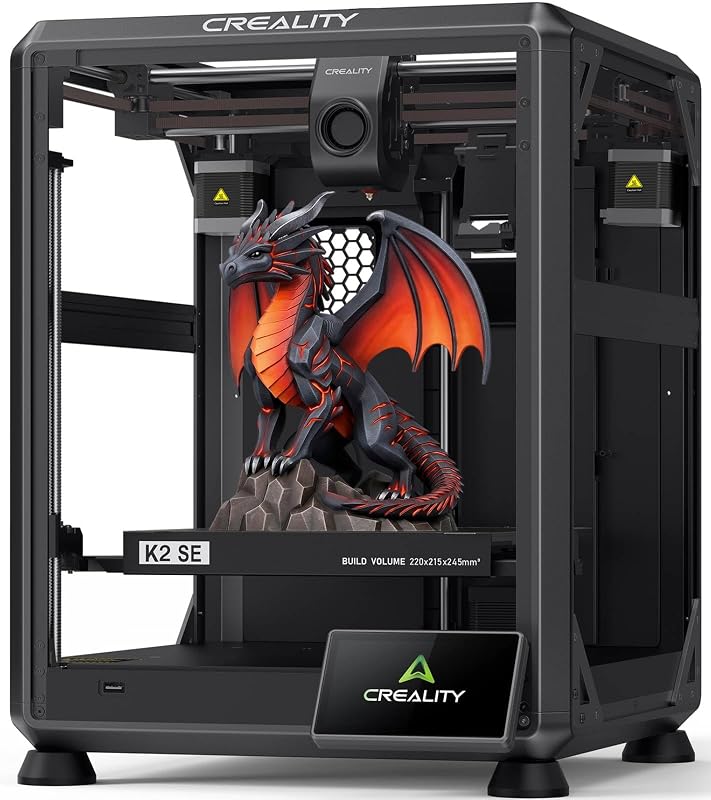
Engineering teams and busy professionals frequently encounter workflow friction with traditional 3D printers, where slow speeds and frequent manual calibration disrupt design schedules. The Creality K2 SE addresses these operational challenges with a rigid CoreXY platform optimized for high-acceleration throughput. Designed for technical users who need rapid iteration without constant machine maintenance, it focuses on delivering dependable motion control and automated setup straight out of the box.
Our analysis reveals that this machine provides a meaningful upgrade in structural stability and speed compared to older bedslinger designs like the ender 3 3d printer. While achieving multicolor printing requires an external accessory, the core unit offers a well-built foundation for rapid prototyping and functional parts fabrication.
01 Quick Verdict
The Creality K2 SE is a capable, high-speed CoreXY workstation designed for professionals seeking rapid turnarounds and automated calibration without unnecessary operational friction. While unlocking multicolor capabilities requires a separate hardware investment, its rigid metal chassis and hands-free leveling make it an efficient production tool.
- Lightweight CoreXY motion system reaching 500mm/s speeds with 20,000mm/s² acceleration.
- Die-cast aluminum alloy frame equipped with corner gussets and dual-side crossbeams.
- Hands-free automatic bed leveling and fan calibration via a single touchscreen tap.
- Modular direct drive extruder with hardened steel dual gears and a quick-swap nozzle.
02 Creality K2 SE Features Explained
01 CoreXY Architecture and High-Speed Dynamics
The motion system relies on a lightweight CoreXY gantry that moves the toolhead using anchored stationary motors. By removing heavy stepper motors from the moving carriage, the printer dramatically reduces inertial mass. This architecture enables the creality k2 se corexy speed to reach up to 500mm/s with 20,000mm/s² acceleration, allowing rapid directional changes without sluggish travel moves.
To preserve wall quality at elevated speeds, the machine incorporates an integrated vibration sensor and an input shaping algorithm. This system actively calculates and cancels mechanical resonance during directional shifts. When using the creality k2 se for prototyping, this compensation prevents ringing and ghosting on vertical surfaces, producing clean exterior walls on functional components.
02 Die-Cast Structural Rigidity
High acceleration generates substantial inertial forces that can flex flimsy frames and distort dimensional precision. To withstand these forces, the Creality K2 SE is built around a die-cast aluminum alloy frame supported by corner gussets and dual-side crossbeams. This robust metal structure minimizes mechanical flex during rapid toolhead movements.
The rigid chassis ensures dimensional consistency across repeat production runs. Unlike modular bolted extrusions that can vibrate out of square over prolonged operation, the die-cast design maintains geometric alignment, reducing the need for continuous mechanical maintenance and re-squaring.
03 Direct Drive Extrusion and Quick-Swap Nozzle
Accurate filament control at high throughput requires positive feeding grip. The creality k2 se direct drive extruder features hardened steel dual-drive gears that provide continuous feeding pressure without stripping the filament. The close coupling between the drive gears and melt zone ensures sharp retractions, mitigating stringing across intricate travel paths.
Maintenance is simplified through a quick-swap nozzle assembly, which reduces operational downtime. Unlike traditional threaded hotends, such as those found on an ender 3 v2, worn nozzles can be exchanged rapidly without complex disassembly. An integrated filament run-out sensor also halts prints automatically if a spool runs out, preventing lost print jobs.
04 Automated Calibration and Rapid Setup
Manual bed leveling wastes valuable technical hours and introduces human error. The creality k2 se auto leveling system uses an automated sensor array that checks the build platform via a single tap on the touchscreen. The system maps surface variations, sets initial layer offsets, and executes an automated fan calibration routine without manual intervention.
Commissioning the printer is straightforward, requiring approximately 5 minutes of initial mechanical assembly. The touchscreen Quick Guide directs users through baseline calibration, verifying axis travel and sensor readings before the first print. This automated routine ensures reliable first-layer adhesion without tedious manual bed adjustments.
05 Creality OS Ecosystem and CFS Multicolor Readiness
The software environment is powered by Creality OS, supporting LAN multi-printer control and expert-mode parameter adjustments from a personal computer. Creality Print slicing software complements the hardware with over 40 filament presets and advanced toolpath planning designed for high-velocity deposition.
Serving as an upgrade to the K1 SE, the printer is engineered for expanded creality k2 se multicolor cfs capability when paired with the optional Creality CFS unit. Although the CFS module is sold separately, the printer includes the firmware support and physical connectivity needed for automatic filament identification and spool relay, similar to multi-material architectures reviewed in our creality cfs c coverage.
03 Specs
| Attribute | Detail |
|---|---|
| Product Dimensions | 13.98″D x 13.96″W x 18.98″H |
| Item Weight | 12.5 kg |
| Print Size | 220 x 215 x 245 mm |
| Motion System | CoreXY |
| Maximum Print Speed | 500 mm/s |
| Maximum Acceleration | 20,000 mm/s² |
| Frame Construction | Die-cast aluminum alloy with corner gussets and dual-side crossbeams |
| Extruder | Direct drive with hardened steel dual-drive gears and quick-swap nozzle |
| Bed Leveling | Fully automatic one-tap leveling and fan calibration |
| Software & Connectivity | Creality OS, Creality Print (40+ presets), Creality Cloud, LAN control, Personal Computer |
| Multicolor Support | Compatible with Creality CFS (sold separately) |
04 Creality K2 SE Pros and Cons
Pros
- Up to 500mm/s speed with 20,000mm/s² acceleration
- Rigid die-cast aluminum alloy frame with crossbeams
- Fully automated one-tap bed leveling and fan calibration
- Modular direct drive extruder with quick-swap nozzle
- Expandable multicolor support via Creality CFS unit
Cons
- Creality CFS multicolor system sold separately
- Open frame design without an enclosed build chamber
- Listing does not specify maximum hotend temperature
05 Best Use Cases
- Rapid iterative prototyping for product design teams requiring same-day physical validation of functional components.
- Fabricating custom assembly jigs, holding fixtures, and brackets that demand rigid structural stability.
- Medium-format multi-part batch production using the full 220 x 215 x 245 mm creality k2 se print size capacity.
- Workstation-managed print farm operations coordinated through centralized LAN multi-printer control.
- Multicolor modeling and multi-material component fabrication when expanded with the optional Creality CFS system.
06 Before You Buy
Before purchasing the Creality K2 SE, verify that its configuration aligns with your project requirements. While the printer is marketed with multicolor printing capabilities, the listing explicitly notes that multicolor functionality requires the Creality CFS unit, which is sold separately. Furthermore, the listing does not specify the maximum operating temperatures for the hotend or heated bed, nor does it list specific filament material compatibility or an enclosed build chamber. Users planning to run high-temperature industrial materials should confirm compatibility before deployment.
Workspace planning is also necessary. Measuring 13.98 inches deep, 13.96 inches wide, and 18.98 inches high, with a weight of 12.5 kg, the printer is moderately compact but generates substantial dynamic forces at 20,000 mm/s² acceleration. It should be placed on a rigid, stable table to prevent vibration transfer. Note also that the listing does not specify bundled tools, replacement parts, or sample filament spools in the box.
07 How It Compares With Similar Picks
| Product | Best For | Key Difference |
|---|---|---|
| Creality K2 SE | High-speed prototyping with optional multicolor expansion | CoreXY platform offering 500mm/s speed, 220x215x245mm build size, and CFS compatibility (CFS sold separately). |
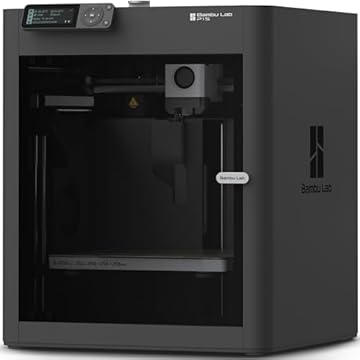
| MakerWorld Model Library | Out-of-the-box multicolor production | Includes the Bambu Lab P1S printer bundled with the AMS multi-color system ready to use. |
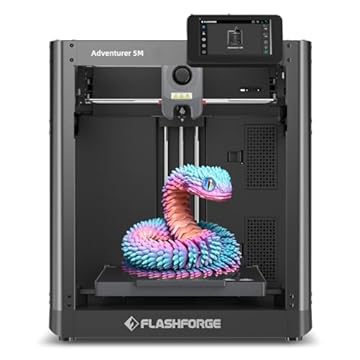
| FLASHFORGE Adventurer 5M 3D Printer | High single-material speed and elevated nozzle temperatures | Features 600mm/s maximum speed, a 280°C direct extruder, and a 3S detachable nozzle on a 220x220x220mm volume. |
| Beginner-Friendly Ecosystem with MakerWorld Model | Enclosed CoreXY fabrication | Enclosed Bambu Lab P1S chamber with integrated MakerWorld model library support. |
Choose the MakerWorld Model Library bundle if your primary objective is multi-color printing from day one, as it includes the AMS unit directly. If your work requires higher hotend temperatures or faster top speed for single-material jobs, the FLASHFORGE Adventurer 5M 3D Printer provides a 280°C rating and 600mm/s velocity. For those requiring a factory-enclosed chamber for thermal control, consider the Beginner-Friendly Ecosystem with MakerWorld Model. The Creality K2 SE remains best suited for operators who want a rigid, open CoreXY platform that can be upgraded with multicolor capabilities later.

08 Bottom Line
When deciding whether is creality k2 se worth it for your business or studio, the primary considerations are motion speed, structural rigidity, and workflow automation. The printer successfully eliminates the time-consuming leveling procedures and slow print speeds associated with earlier generation equipment. Its die-cast aluminum frame and 500mm/s CoreXY gantry deliver rapid, dimensionally consistent prototypes with minimal user intervention.
Although full multicolor functionality requires purchasing the Creality CFS unit separately, the base printer provides a dependable platform for everyday rapid prototyping. With its quick 5-minute assembly, automated calibration, and Creality OS connectivity, the Creality K2 SE is a solid tool for professionals seeking to streamline their fabrication workflow.
09 FAQ
What is the maximum printing speed of the Creality K2 SE?
The printer achieves a maximum printing speed of 500mm/s with an acceleration of 20,000mm/s². Its lightweight CoreXY gantry and built-in vibration compensation work together to maintain smooth print surfaces at elevated speeds.
Does the Creality K2 SE come with multicolor printing out of the box?
No, multicolor printing requires the Creality CFS multicolor system, which is sold separately. Once connected, the CFS unlocks automatic filament identification and spool relay.
What are the creality k2 se specs regarding build volume?
The printer offers a build volume measuring 220 x 215 x 245 mm, providing ample room for prototyping functional assemblies and mechanical components.
How long does the initial setup take?
Initial physical assembly takes approximately 5 minutes. The color touchscreen Quick Guide then walks users through fully automatic bed leveling, fan calibration, and baseline tuning.
What slicing software and connectivity does the printer support?
The machine runs on Creality OS and connects to personal computers. It is supported by Creality Print software with over 40 material presets, and it supports LAN multi-printer control and Creality Cloud workflows.