As Amazon Associates, we earn from qualifying purchases. This means we may receive a small commission at no extra cost to you if you click through and make a purchase.

Engineering teams and product designers face an unrelenting demand to turn digital CAD concepts into physical prototypes within compressed production cycles. Traditional bedslinger FDM machines often struggle to maintain dimensional accuracy when pushed beyond moderate speeds, introducing mechanical layer shifts and surface artifacts that compromise functional testing. The Anycubic Kobra S1 enters this high-demand workspace as a dedicated solution, combining an ultra-stable CoreXY kinematic layout with a high-temperature thermal system to accelerate prototyping cycles without sacrificing part reliability. For professionals requiring rapid verification of mechanical assemblies, the anycubic kobra s1 3d printer offers a platform built specifically to bridge the gap between rapid design iteration and durable thermoplastic fabrication.
Our comprehensive analysis confirms that the Anycubic Kobra S1 delivers exceptional mechanical rigidity and thermal capabilities that make it a formidable competitor in the desktop additive manufacturing space. Featuring travel velocities up to 600mm/s, an all-metal hotend rated to 320°C, and fully automated calibration, it addresses the core operational frustrations that slow down engineering teams. While multi-material setups require additional hardware and firmware considerations, teams comparing additive technologies against resin options like the anycubic mono m7 will find this CoreXY system highly capable of delivering durable, functional thermoplastic components.
01 Quick Verdict
The Anycubic Kobra S1 delivers outstanding kinematics, reliable extrusion, and top-tier thermal metrics that cater directly to production-focused design studios. Its rigid CoreXY chassis eliminates bed inertia issues, making it a reliable workhorse for teams working with technical thermoplastics.
- Industrial-grade 600mm/s maximum travel speed paired with 20000mm/s² acceleration for rapid mechanical turnaround.
- All-metal hotend achieving 320°C alongside a 120°C heated bed to handle structural filaments like ABS, ASA, and PETG.
- LeviQ 3.0 sensor suite providing fully automated bed leveling and Z-axis compensation straight out of the box.
- Standalone hardware package that requires firmware updates and an upgrade kit to bridge existing ACE Pro multicolor systems.
02 Anycubic Kobra S1 Features Explained
01 CoreXY Motion Architecture and Dual Motor Drive
The core mechanical foundation of the machine centers entirely on the anycubic kobra s1 corexy motion system. Unlike conventional Cartesian printers where the build plate reciprocates along the Y-axis, this unit isolates the bed along the vertical plane while handling horizontal toolhead movement through synchronized belts powered by dual motors. This structural design drastically lowers moving mass, which is critical when capitalizing on the anycubic kobra s1 print speed of 600mm/s and aggressive acceleration rates of 20000mm/s².
By pairing dual-motor synchronization with the proprietary Kobra OS operating system, the printer minimizes mechanical vibrations that typically produce ringing or ghosting on vertical surfaces. This mechanical stabilization ensures that parts printed at high velocities retain crisp corner geometry, tight hole tolerances, and uniform wall thicknesses, giving engineering teams complete confidence during functional fit checks.
02 High-Temperature Hotend and Engineering Filament Compatibility
Material flexibility dictates the utility of any prototyping tool, and the anycubic kobra s1 filament compatibility spectrum stands out due to its thermal hardware. The all-metal hotend reaches temperatures up to 320°C, while the heated build plate consistently maintains up to 120°C. These thermal thresholds allow operators to deploy technical thermoplastics such as ABS and ASA for parts requiring high heat deflection and ultraviolet resistance, as well as flexible TPU, durable PETG, and standard PLA.
Thermal stability across the melt zone prevents under-extrusion during aggressive extrusion sequences. The extruder assembly supports multiple nozzle apertures, accommodating 0.2 mm, 0.4 mm, 0.6 mm, and 0.8 mm diameters to balance fine aesthetic detail against ultra-fast bulk deposition. Users who handle technical materials alongside enclosed air purification hardware, such as the panda breath biqu, will appreciate the thermal ceiling of this machine when extruding high-temperature engineering filaments.
03 LeviQ 3.0 Automated Calibration and First-Layer Control
First-layer adhesion issues remain the primary cause of print failures in technical prototyping workflows. The anycubic kobra s1 leviq 3.0 platform resolves this through a fully integrated auto-leveling matrix and automatic Z-axis height compensation. Utilizing precision sensing, the system samples the build surface before extrusion begins, calculating an exact topography compensation mesh without requiring manual thumbwheel adjustments or paper-sliding routines.
Because the Z-axis offset is calculated and compensated programmatically, the printer delivers clean, uniform squish across the entire bed. This level of automation ensures true out-of-the-box readiness for both novice users and experienced engineering operators, substantially decreasing machine preparation overhead and eliminating warped first layers on large structural prints.
04 Multicolor Architecture and ACE Pro Integration Details
The machine supports multi-material manufacturing, but deploying anycubic kobra s1 multicolor printing requires specific hardware planning. This listing ships as a standalone unit without the multi-material feeder included in the package. Users aiming to produce color-coded functional components or multi-material assemblies must acquire the Anycubic ACE Pro unit separately.
Prospective buyers must note the specific anycubic kobra s1 ace pro compatibility parameters defined by the manufacturer. If you already own an ACE Pro originally designed for the Kobra 3 series, it is not plug-and-play out of the box; you must purchase a dedicated upgrade kit to establish physical and electronic compatibility with this model. Furthermore, operators must update the machine firmware to version v2.4.8.3 or later to unlock multi-color functionality within the Kobra OS environment.
05 Kobra OS and Makeronline Software Ecosystem
A capable motion system requires robust control architecture, which is provided by Kobra OS. The operating firmware handles complex trajectory planning, real-time step calculations, and vibration mitigation routines with minimal latency. It translates slicing instructions into fluid mechanical commands, preventing the micro-stutters that degrade surface finish on curved geometries.
For standardized parts and shared visual aids, the platform connects seamlessly to Makeronline, Anycubic’s self-operated digital model library. This ecosystem provides direct access to high-quality design assets from over 3,000 international contributors. Sourcing verified models directly through the platform shortens the conceptualization pipeline, letting teams transition from digital repository to tangible test artifact with minimal preparation overhead.
03 Specs
| Attribute | Detail |
|---|---|
| Kinematic Architecture | CoreXY with Dual Motor Drive |
| Maximum Travel Speed | 600mm/s |
| Maximum Acceleration | 20000mm/s² |
| Hotend Maximum Temperature | 320°C |
| Heated Bed Maximum Temperature | 120°C |
| Bed Leveling System | LeviQ 3.0 Automatic Bed Leveling and Z-Axis Compensation |
| Supported Filament Types | PLA, TPU, ASA, ABS, PETG |
| Supported Nozzle Sizes | 0.2 mm, 0.4 mm, 0.6 mm, 0.8 mm |
| Product Dimensions | 22″D x 19″W x 18″H |
| Operating System | Kobra OS with Makeronline Ecosystem Integration |
04 Anycubic Kobra S1 Pros and Cons
Pros
- 600mm/s travel speed with 20000mm/s² acceleration
- High-temperature 320°C hotend and 120°C heated bed
- Rigid CoreXY frame with dual motor drive
- LeviQ 3.0 auto bed leveling and Z-offset
- Broad filament support including ABS, ASA, and TPU
Cons
- ACE Pro multicolor unit requires separate purchase
- Existing Kobra 3 ACE Pro units require upgrade kit
- Firmware update required to unlock color functionality
05 Best Use Cases
- Deploying the anycubic kobra s1 for rapid prototyping of functional mechanical components using resilient ABS and ASA engineering materials.
- Fabricating customized, flexible production jigs, dynamic seals, and vibration dampeners utilizing high-grade TPU filament.
- Executing high-throughput PLA and PETG verification batches that leverage the 600mm/s travel speed to shorten cycle times.
- Producing multi-tone aesthetic models and visible instructional prototypes once integrated with an upgraded ACE Pro color management unit.
06 Before You Buy
Before purchasing, buyers must evaluate package contents and hardware compatibility. This listing provides the standalone 3D printer hardware only, meaning it does not come packaged with the Anycubic ACE Pro unit. Those intending to print multi-material objects must purchase the ACE Pro unit separately, and users who already possess an ACE Pro unit built for the Kobra 3 must install a separate upgrade adapter kit and flash firmware version v2.4.8.3 or newer to enable color-switching communication.
Buyers should also note that while the manufacturer confirms structural metal construction and overall external dimensions of 22″D x 19″W x 18″H, the listing does not specify the exact internal build volume dimensions. Routine hotend maintenance remains essential for high-velocity printing, and the manufacturer recommends consulting their official WIKI troubleshooting resources for proper hotend reassembly to prevent nozzle clogs. Teams that also utilize high-precision resin printing hardware, such as the anycubic photon mono 4 ultra, will recognize that proper FDM maintenance is vital for maintaining tight geometric tolerances across daily production cycles.
07 How It Compares With Similar Picks
| Product | Best For | Key Difference |
|---|---|---|
| Anycubic Kobra S1 | High-temperature CoreXY technical prototyping | 320°C all-metal hotend and LeviQ 3.0 leveling provided in a standalone platform |
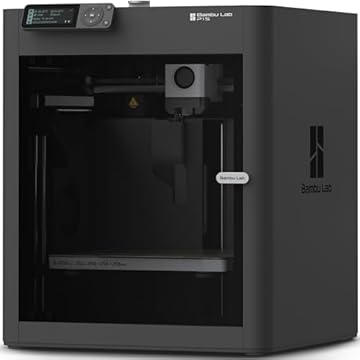
| MakerWorld Model Library | Integrated multicolor CoreXY production | Ships as a complete P1S Combo bundle containing an automated material system |
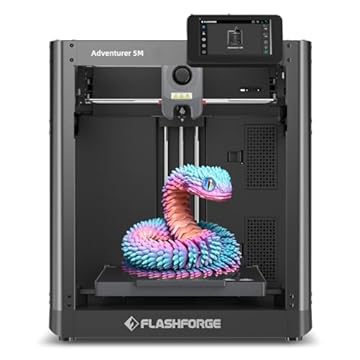
| FLASHFORGE Adventurer 5M 3D Printer | Rapid everyday workshop prototyping | Features a 280°C direct extruder with 3S detachable nozzles and a 220x220x220mm build size |
| Beginner-Friendly Ecosystem with MakerWorld Model | Enclosed single-unit CoreXY manufacturing | Fully enclosed chamber design operating within the MakerWorld software environment |
Choosing between these options depends on your workflow requirements regarding material temperature limits and bundled accessories. If your development team requires high-temperature extrusions up to 320°C and a 120°C bed for processing technical polymers like ASA and ABS, the Kobra S1 holds a distinct thermal advantage over the 280°C limit found on alternatives like the FLASHFORGE Adventurer 5M 3D Printer. However, if your team demands out-of-the-box multicolor switching without needing separate upgrade adapters or firmware updates, bundled options like the MakerWorld Model Library P1S Combo provide a pre-packaged multi-filament feeder immediately upon delivery.

08 Bottom Line
Evaluating whether the machine fits your development lab comes down to thermal performance and mechanical stability. So, is anycubic kobra s1 worth it for busy design engineers? For professionals who need a fast, rigid CoreXY platform capable of plasticizing engineering-grade filaments without mechanical flex, the machine delivers exceptional structural performance. Its 320°C hotend, 120°C build surface, and LeviQ 3.0 sensor architecture make short work of complex prototyping runs.
While prospective buyers seeking multi-color capabilities must plan ahead for the separate ACE Pro hardware and necessary firmware updates, the standalone machine excels in raw speed and thermal capacity. The Anycubic Kobra S1 stands out as a highly reliable, high-speed CoreXY fabrication tool that accelerates iterative design and satisfies tough technical requirements.
09 FAQ
What is the maximum printing speed of the Anycubic Kobra S1?
The printer achieves a maximum travel speed of 600mm/s backed by an acceleration rate of 20000mm/s². The dual-motor CoreXY motion platform and Kobra OS work together to keep mechanical vibrations controlled during high-speed printing routines.
Can the Anycubic Kobra S1 handle high-temperature materials like ABS and ASA?
Yes, the printer features a full metal hotend capable of reaching up to 320°C and a heated bed that reaches up to 120°C. These thermal parameters provide stable processing conditions for ABS, ASA, PETG, TPU, and PLA.
How does ACE Pro compatibility work on the Anycubic Kobra S1?
The printer supports multicolor printing through the Anycubic ACE Pro system, but it is not bundled with the printer. If you already own an ACE Pro built for the Kobra 3, you must acquire a specialized upgrade kit to connect it, and you must update the printer firmware to version v2.4.8.3 or later.
What nozzle sizes can be installed on the machine?
The hotend assembly supports multiple nozzle diameters, including 0.2 mm, 0.4 mm, 0.6 mm, and 0.8 mm sizes, enabling users to choose between detailed surface finishes and accelerated bulk material deposition.
How does the LeviQ 3.0 leveling system function?
LeviQ 3.0 automates both platform leveling and vertical Z-axis height compensation across the print surface. It maps the bed topography automatically prior to printing, eliminating manual bed leveling and ensuring an even first layer straight out of the box.