As Amazon Associates, we earn from qualifying purchases. This means we may receive a small commission at no extra cost to you if you click through and make a purchase.

Desk real estate is a premium asset for professionals working remotely, yet occasional paperwork, signed agreements, and return labels still demand physical processing. Full-sized enterprise printers devour excessive space and demand complex network configurations that make little sense for low-volume output. The HP DeskJet 2755 addresses this exact friction point by combining essential document generation, scanning, and copying into a streamlined desktop unit weighing just 7.6 pounds. Built specifically for users who need dependable basic execution without cumbersome hardware, this color inkjet unit balances practical capability with a tiny desk footprint.
For professionals evaluating the HP DeskJet 2755 for home office use, the verdict comes down to duty cycle and convenience. If your daily routine involves producing high-volume business reports or multi-page double-sided packets, its entry-level throughput will test your patience. However, as an agile secondary device or low-frequency document hub that integrates seamlessly with smartphones and laptops, it performs its core duties with minimal friction and simple setup procedures.
01 Quick Verdict
The HP DeskJet 2755 is an efficient, space-conscious all-in-one printer engineered for light-duty domestic tasks, quick digital scanning, and sporadic hard-copy generation.
- Compact, lightweight chassis measuring under 17 inches wide and weighing only 7.6 pounds.
- Dual-band Wi-Fi with self-resetting connectivity alongside Bluetooth app-based setup.
- Straightforward HP Smart app integration enabling instant scanning directly to cloud storage platforms.
- Practical 7.5 page-per-minute monochrome copy rate suited for routine household and office forms.
02 HP DeskJet 2755 Features Explained
01 Dual-Band Wireless Setup and Hardware Interfaces
Reliable network communication remains the foundational requirement for any remote office peripheral. The HP DeskJet 2755 wireless setup leverages dual-band Wi-Fi technology equipped with self-reset capabilities, which detects connection drops and automatically reconnects across 2.4 GHz and 5.0 GHz wireless bands. Bluetooth connectivity accelerates the initial pairing process, allowing laptops, PCs, and smartphones to discover the peripheral quickly without requiring complex manual IP configuration.
For workstations situated in environments with congested wireless frequencies or strict corporate security profiles, the device also includes a dedicated rear USB port for direct PC connection. This physical link ensures uninterrupted local processing when wireless communication is unavailable or restricted by administrative firewalls. The built-in LCD display provides instant visual feedback on network status and active job queues, preventing guesswork during heavy workdays.
02 HP Smart App and Mobile Printing Integration
Modern remote work relies heavily on handheld devices, making HP DeskJet 2755 mobile printing a centerpiece of its daily functionality. Through the proprietary HP Smart app, users can trigger color print jobs, check ink levels, and manage print queues directly from iOS and Android smartphones without booting up a desktop computer. The software interface bypasses traditional driver installations, streamlining routine document execution across phones, tablets, and mobile laptops.
Beyond standard output, the app bridges physical documents with remote cloud collaboration tools. Scans initiated through the flatbed unit can be automatically routed to email recipients, Google Drive, Dropbox, or secure private cloud directories. Furthermore, voice-enabled command functionality via Amazon Alexa controller integration permits hands-free initiation of standard checklists, forms, and scheduled calendar printouts.
03 Flatbed Scanner and Document Copying Performance
The HP DeskJet 2755 scan and copy subsystem relies on an integrated optical flatbed scanner rather than a motorized roller assembly. This flat glass surface protects delicate documents, thick utility bills, passports, and identification cards that would otherwise jam or suffer physical damage in a standard sheet feeder. Users simply lift the top lid, align their document against the registration guides, and close the cover to capture clear digital images for archiving or distribution.
Copying functionality operates directly from the top panel controls, utilizing the embedded LCD display to set copy quantities without opening a software client on a computer. Because the mechanism uses a flatbed design, processing double-sided identification cards or multi-sheet receipts requires manual flipping for every page. For home offices handling sporadic legal filings or customer receipts, this manual approach provides adequate fidelity without mechanical complexity.
04 Ink Management and Instant Ink Integration
Ink delivery and replenishment represent critical operational considerations for any inkjet peripheral. The HP DeskJet 2755 instant ink capability allows the machine to monitor internal fluid reserves autonomously and initiate replacement shipments before cartridges run completely dry. This optional subscription structure advertises scheduled ink replenishment, eliminating unexpected mid-project depletion during critical work hours.
Under the hood, the hardware utilizes the HP 67 cartridge series, shipping with an HP 67 Setup Black cartridge and an HP 67 Setup Tri-color cartridge. Because the color reservoir uses a unified tri-color block rather than independent cyan, magenta, and yellow tanks, depleting one specific shade eventually necessitates swapping the entire color cartridge. For professionals anticipating massive monthly color volumes who want to avoid frequent cartridge replacements, evaluating a high-capacity supertank unit like the epson ecotank et-3850 wireless color all-in-one cartridge-free supertank printer with scanner, copie provides a completely different cost-per-page approach.
05 Print Speeds and Media Handling Versatility
Evaluating the HP DeskJet 2755 print speed highlights the explicit light-duty engineering of the machine. The unit delivers a maximum black-and-white copy speed of 7.5 pages per minute, making it suitable for short, one-to-four-page memos, tax forms, and shipping labels. High-volume document production, however, will feel deliberately paced, as the compact motor and carriage assembly prioritize reliable paper feeding over rapid throughput.
Media flexibility is handled through a single rear-loading input tray that accepts a variety of substrates. In addition to standard plain copy paper, the internal paper path accommodates heavier card stock, envelopes, and adhesive shipping labels. The tray design keeps physical dimensions constrained, although managing mixed media types requires clearing the current paper stack and manually adjusting the physical edge guide for envelopes or specialized labeling stock.
03 Specs
| Specification Attribute | Manufacturer Detail |
|---|---|
| Printer Type | Inkjet |
| Print Output | Color |
| Item Dimensions | 11.97″D x 16.7″W x 6.06″H |
| Item Weight | 7.6 pounds |
| Scanner Type | Flatbed |
| Maximum Copy Speed (Black and White) | 7.5 pages per minute |
| Wireless Connectivity | Dual-Band Wi-Fi with self-reset, Bluetooth |
| Wired Connectivity | USB Port for PC connection |
| Supported Media | Plain paper, Card stock, Envelopes, Labels |
| Display and Controls | LCD Display, HP Smart App, Amazon Alexa |
| Compatible Cartridges | HP 67 Setup Black, HP 67 Setup Tri-color |
| Warranty | Limited Warranty |
04 HP DeskJet 2755 Pros and Cons
Pros
- Compact footprint weighing only 7.6 pounds
- Self-resetting dual-band Wi-Fi connectivity
- Direct mobile scanning to cloud storage
- Handles envelopes, labels, and card stock
- Hands-free control via Amazon Alexa
Cons
- Requires manual flipping for two-sided printing
- No automatic document feeder for scanning
- Modest monochrome copy speed of 7.5 ppm
05 Best Use Cases
- Scanning signed service contracts and receipts directly into Google Drive or Dropbox from a smartphone.
- Printing prepaid shipping manifests, packing slips, and adhesive return labels from an e-commerce desk.
- Producing occasional administrative correspondence and legal forms on standard plain paper.
- Creating custom card stock notices, formatted envelopes, and labeled office folders on demand.
- Operating as a compact backup scanner and monochrome copier for studio apartments and satellite offices.
06 Before You Buy
Understanding compatibility boundaries is vital before integrating this device into your office network. The HP DeskJet 2755 all in one hardware natively interfaces with PCs, laptops, and mobile devices running iOS or Android via the HP Smart application. While the wireless radio supports both 2.4 GHz and 5.0 GHz networks, enterprise Wi-Fi networks requiring specialized browser-based certificate logins may hinder direct connection, making the rear USB port the preferred corporate fallback. The single input tray handles one media type at a time, and the listing does not specify the maximum sheet input capacity, making manual monitoring necessary during medium-sized runs.
Hardware limitations must also be factored into purchase decisions. The listing does not specify whether a physical USB cable is bundled in the retail packaging, so desktop users requiring a wired setup should prepare a compatible cable beforehand. Crucially, the listing does not include an automatic document feeder or automatic duplex printing, meaning two-sided documents require manual sheet flipping. If your workflow requires seamless automatic two-sided reports without physical page intervention, considering an alternative such as the hp envy 6155e wireless all-in-one color inkjet printer, portobello, print, scan, copy, duplex printi will prevent daily workflow bottlenecks.
07 How It Compares With Similar Picks
| Product | Best For | Key Difference |
|---|---|---|
| HP DeskJet 2755 | Light-duty home office tasks and mobile scanning | Dual-band Wi-Fi with self-reset, flatbed scanner, and 7.5 ppm copy speed |
| Cost Efficient Multi-Function Photo Printer | Occasional photo output and basic domestic copying | Compact multi-function chassis optimized specifically for photo and color printing tasks |
| Canon PIXMA TS6520 Wireless Color | Users requiring automated two-sided document generation | Features integrated duplex printing and a 1.42-inch OLED status display |
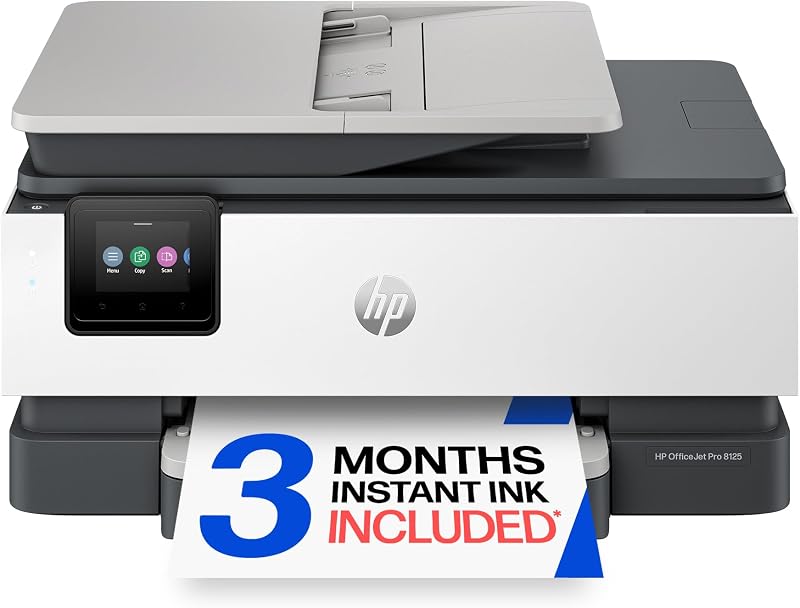
| HP OfficeJet Pro 8125 Wireless | High-volume home office workflows and multi-page processing | Includes an automatic document feeder, duplex printing, and AI capability |
Choosing an alternative model depends strictly on your volume thresholds and document formats. If you regularly scan ten-page legal contracts or double-sided employee packets, the HP OfficeJet Pro 8125 Wireless is the superior match due to its integrated automatic document feeder and duplex engine. If your priority is dedicated, rapid monochrome text documents without the maintenance of color inkjet cartridges, an alternative like the hp laserjet m209d printer eliminates inkjet drying issues entirely. Stick with the HP DeskJet 2755 if your primary requirements are ultra-compact dimensions, simple mobile routing, and low-frequency utility.
08 Bottom Line
Determining whether the HP DeskJet 2755 is worth it comes down to matching your physical workspace and workload expectations with its hardware reality. As a dedicated workhorse for drafting 50-page client presentations, its 7.5 ppm copy pace and manual feed constraints will prove inefficient. However, for freelance consultants, remote contractors, and small home offices that only generate a few dozen pages per month, it delivers dependable scanning, wireless versatility, and crisp text in an exceptionally small footprint.
By prioritizing self-healing dual-band Wi-Fi, smartphone-first cloud workflows, and a clean flatbed scanner, this printer solves the fundamental paperwork challenges of modern telecommuting without consuming valuable desk space or imposing excessive maintenance burdens.
09 FAQ
Does the HP DeskJet 2755 support automatic double-sided printing?
No, the listing does not specify automatic duplex printing for this unit. Users seeking to produce double-sided documents must manually reinsert pages into the single paper tray to print on the reverse side.
Can the HP DeskJet 2755 scan directly to cloud storage services?
Yes, through the HP Smart application, the scanner can capture documents via the flatbed surface and route digital files directly to cloud destinations including Google Drive, Dropbox, email, and network cloud folders.
What paper types and media can the HP DeskJet 2755 handle?
The printer supports standard plain paper, card stock, envelopes, and adhesive labels through its single adjustable rear input tray.
Is a computer required to set up and operate the printer?
No, the unit features Bluetooth-guided setup and Wi-Fi pairing through the HP Smart app on smartphones and tablets, allowing complete driverless initialization without requiring a desktop PC.
Does the HP DeskJet 2755 include an automatic document feeder?
No, the unit utilizes a manual flatbed scanner for copying and scanning. Each document page, receipt, or identification card must be placed individually onto the glass surface.
Does the printer require an active HP Instant Ink subscription to function?
No, the printer is Instant Ink ready, but the subscription is optional. Users can purchase standard HP 67 replacement cartridges independently if they prefer not to maintain a recurring subscription plan.


