As Amazon Associates, we earn from qualifying purchases. This means we may receive a small commission at no extra cost to you if you click through and make a purchase.
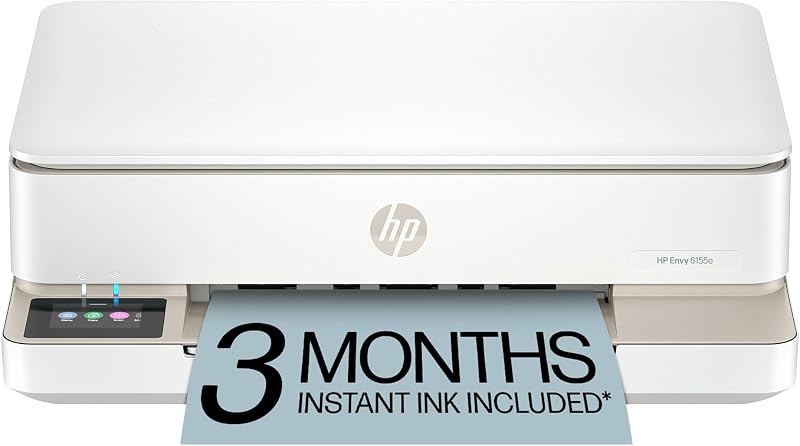
Managing home documentation, school assignments, and occasional photo projects often leads to frustration when equipment is unreliable, slow, or wasteful. For professionals and families seeking a streamlined machine that handles daily paperwork without cluttering a workspace, the HP Envy 6155e provides a modern all-in-one color inkjet solution. It addresses common desktop headaches by integrating automatic two-sided output, intelligent page formatting, and a dedicated color interface into an 11.3-pound chassis designed specifically for home environments.
Our verdict is that this unit excels as a clean, capable peripheral for moderate workloads where document appearance and straightforward navigation take priority. The inclusion of intelligent web layout cleanup and true-to-screen photo rendering makes it an attractive daily driver, provided you are comfortable operating within the manufacturer’s strict cartridge ecosystem and automated firmware updates.
01 Quick Verdict
The HP Envy 6155e is an efficient, well-rounded all-in-one printer engineered for households and personal workspaces that need consistent document rendering, borderless photo capabilities, and hassle-free wireless management.
- Prints crisp text and vibrant borderless photos with HP P3 color technology
- Saves paper automatically using standard two-sided duplex output
- Minimizes misprints from web browsers and email clients through automated HP AI formatting
- Restricts ink replacements strictly to cartridges equipped with original HP microchips or circuitry
02 HP Envy 6155e Features Explained
01 HP AI Printing and Document Optimization
One of the persistent inefficiencies in home printing is the accidental output of trailing web links, advertisements, and blank pages when trying to capture articles or digital receipts. The hp envy 6155e ai printing functionality directly tackles this problem by analyzing web pages and emails before they hit the print queue. The software automatically detects and strips out unwanted clutter, ensuring that only the relevant text and imagery are formatted onto the physical page.
This automated layout correction prevents paper waste and ink depletion, eliminating the tedious manual formatting that typical desktop tasks require. For users who regularly handle online invoices, research briefs, or digital confirmations, the system produces tidy, predictable printouts without requiring third-party formatting plug-ins.
02 Hardware Output and Duplex Printing Efficiency
Paper management is anchored by an internal 100-sheet input tray that holds standard plain media, envelopes, and labels. The hp envy 6155e duplex printing mechanism handles two-sided sheets automatically, flipping documents internally so you do not have to manually reinsert paper to produce professional double-sided manuals or homework packets. Speed ratings sit at up to 10 pages per minute for monochrome text and up to 7 pages per minute for color documents.
While these throughput speeds are tailored for domestic and low-volume administrative duties rather than massive corporate print queues, the automated duplexing saves substantial operational time. Shoppers who regularly compare multifunction designs against entry-level models like the hp deskjet 2827e wireless all-in-one color inkjet printer, scanner, copier, best-for-home, 3 month i will find that the integrated duplex tray on the 6155e significantly upgrades everyday usability.

03 Onboard Control with the 2.4-Inch Color Touchscreen
Direct device interaction is managed through a front-facing 2.4-inch color touchscreen display. The hp envy 6155e color touchscreen simplifies standalone workflows, allowing you to walk up to the machine and trigger walk-up copies, adjust resolution preferences, or check Wi-Fi integrity without opening a software client on your computer.
The interface provides intuitive icon-driven navigation, keeping configuration menus flat and responsive. You can configure multi-copy runs of up to 99 copies per session directly from the panel, making it simple to duplicate physical forms, meeting agendas, or classroom handouts rapidly.
04 Dual-Band Wireless Setup and Smart App Functionality
Network connectivity is anchored by dual-band Wi-Fi engineered to detect and resolve signal drops automatically. Completing an hp envy 6155e wireless setup involves connecting via the HP App on an iOS, Android, PC, or Mac platform. The dual-band architecture continuously monitors wireless stability, reconnecting to the optimal frequency band if localized interference occurs.
Through the companion app, users can initiate print runs, capture mobile scans via smartphone cameras, monitor cartridge reserves, and dispatch mobile faxes without maintaining an analog telephone line. The single internal processor and unified driver setup ensure rapid discovery across laptops and mobile handsets linked to the same local network.
05 Color Fidelity and Flatbed Scan and Copy Workflows
For creative output, this model incorporates HP P3 color technology designed to produce true-to-screen fidelity for documents and borderless color snapshots. The color delivery is optimized across black, cyan, magenta, and yellow channels, capturing subtle gradients and vivid hues that match digital screen previews closely.
Digitizing physical media is handled by an integrated flatbed scanner. The hp envy 6155e scan and copy hardware gives you a rigid glass platen capable of handling delicate photos, stiff identification cards, and bound notebooks that cannot pass through a mechanical roller. Copies can be rendered in full color or monochrome with custom density adjustments accessible right from the front screen.
03 Specs
A closer look at the hp envy 6155e specs reveals how its physical footprint and component engineering support everyday domestic workflows:
| Attribute | Detail |
|---|---|
| Printer Type | Color Inkjet Multifunction |
| Functions | Print, copy, scan |
| Print Speed | Up to 10 ppm black, up to 7 ppm color |
| Duplex Printing | Automatic two-sided printing |
| Paper Capacity | 100-sheet input tray |
| Supported Media | Plain paper, envelopes, labels |
| Scanner Type | Flatbed platen |
| Display | 2.4-inch color touchscreen |
| Maximum Copy Quantity | Up to 99 copies per run |
| Dimensions & Weight | 14.21″D x 17.05″W x 5.35″H; 11.3 lbs |
| Connectivity | Self-healing dual-band Wi-Fi, HP App |
| Cartridge Security | Dynamic security requiring original HP chips or circuitry |
04 HP Envy 6155e Pros and Cons
Pros
- Automated two-sided duplex printing
- HP AI formatting prevents wasted web pages
- Vibrant 2.4-inch color touchscreen display
- Self-healing dual-band Wi-Fi connection
- True-to-screen P3 color photo reproduction
Cons
- Dynamic security blocks non-HP cartridge chips
- Modest print speeds of 10 ppm black
- Flatbed scanner lacks an automatic document feeder
05 Best Use Cases
- Deploying the hp envy 6155e for home office spaces requiring consistent daily printing of two-sided contracts, reports, and administrative forms.
- Handling family homework assignments and school projects where automated AI layout prevents trailing blank pages from web research.
- Producing borderless family snapshots and personal photo albums using HP P3 true-to-screen color matching technology.
- Scanning thick media, bound receipts, and sensitive documents safely using the built-in flatbed glass platen.
- Operating in compact desks or shared living areas where a slim 5.35-inch vertical clearance and quiet wireless operation fit neatly.
06 Before You Buy
Before purchasing, buyers must understand the cartridge limitations built into this platform. The printer operates with dynamic security measures that actively block any ink cartridge utilizing non-HP microchips or unauthorized electronic circuitry. The manufacturer deploys periodic firmware updates over the dual-band Wi-Fi network specifically to maintain these barriers. For ink replenishment, the listing includes a 3-month trial of the hp envy 6155e instant ink delivery service upon HP+ activation; after this period concludes, a monthly fee applies automatically unless canceled by the user.
Additionally, note the mechanical hardware boundaries stated in the official product specifications. The device includes a flatbed scanner but does not include an automatic document feeder for multi-page batch scanning. The chassis houses a single 100-sheet input tray, and there is no physical Ethernet port listed for wired local-area networks. Users handling massive multi-page document archives or looking for unchipped tank reservoirs might prefer evaluating high-capacity designs such as the epson ecotank et-3850 wireless color all-in-one cartridge-free supertank printer with scanner, copie before settling on a cartridge-based machine.
07 How It Compares With Similar Picks
| Product | Best For | Key Difference |
|---|---|---|
| HP Envy 6155e | Home Offices & Photo Tasks | Integrated HP AI formatting, 2.4-inch color touchscreen, and auto duplexing with dynamic chip security |
| Cost Efficient Multi-Function Photo Printer | Entry-Level Home Printing | Focuses on basic print, copy, and scan functions in a compact footprint without AI page optimization |
| Canon PIXMA TS6520 Wireless Color | Compact Two-Sided Output | Features a smaller 1.42-inch monochrome OLED display rather than a 2.4-inch full-color touchscreen |
| Best-for-home | Multi-Page Document Ingestion | Provides an integrated automatic document feeder, 1.8-inch display, and smart assistant compatibility |
Choosing an alternative makes sense if your daily tasks involve distinct functional requirements. If you frequently digitize lengthy twenty-page paperwork stacks, selecting an option equipped with an automatic document feeder saves significant manual labor over the flatbed-only design of the 6155e. Conversely, if you want simple, entry-level photo printing without digital subscription offerings, simpler compact photo printers provide standard basic functionality without recurring account commitments.
08 Bottom Line
So, is hp envy 6155e worth it for your setup? If your routine involves printing everyday correspondence, borderless photography, and research materials where automated page formatting and double-sided duplexing save valuable time, this unit represents an exceptionally modern choice. The 2.4-inch touchscreen makes walk-up copying seamless, while dual-band wireless ensures your laptops and smartphones print reliably on demand.
However, you must accept that third-party generic cartridges are locked out by dynamic security firmware. If you are satisfied utilizing authentic cartridges or managing an automated delivery subscription, the HP Envy 6155e provides high convenience and clean page presentation. Those seeking minimal hardware complexity can also review bare-bones models like the hp deskjet 2755 printer, but for automated two-sided duplexing and AI-assisted page cleanup, the Envy 6155e stands out as a capable desktop performer.
09 FAQ
Does the HP Envy 6155e perform automatic two-sided duplex printing?
Yes, the HP Envy 6155e has an internal auto-duplexing mechanism that prints on both sides of the sheet without requiring you to manually re-feed the paper.
How does the HP AI printing feature assist with web pages?
The integrated HP AI scans digital documents, web articles, and emails to remove unwanted graphics, navigation bars, and extra blank pages, outputting clean layouts without user formatting.
Can I use third-party refill cartridges in this printer?
No, the printer is engineered with dynamic security measures that require cartridges with original HP microchips or circuitry, actively blocking cartridges with third-party components via firmware updates.
What devices can connect to the HP Envy 6155e?
The printer connects wirelessly via dual-band Wi-Fi and supports laptops, desktop PCs, tablets, and smartphones using iOS, Android, and standard operating systems via the companion HP App.
Does the HP Envy 6155e include an automatic document feeder for multi-page scanning?
No, the listing specifies a flatbed glass scanner, which requires placing each sheet, photo, or book page individually onto the glass platen for scanning and copying.


