As Amazon Associates, we earn from qualifying purchases. This means we may receive a small commission at no extra cost to you if you click through and make a purchase.

Clutter and sluggish document processing frequently disrupt modern work routines, particularly when juggling administrative tasks, client correspondence, and creative projects from a home office. Many professionals find themselves overwhelmed by bulky desktop machinery or frustrated by single-tray setups that force constant paper reloading. The Canon PIXMA TS6420a addresses this daily friction by combining print, copy, and scan functions into a compact, low-profile form factor designed to handle varied print media with minimal desk takeover.
For individuals managing remote workloads or light clerical operations, this color inkjet unit stands out through its dual-feed flexibility, automated two-sided output, and simplified status monitoring. It provides a balanced, efficient solution for general office tasks and mixed media without demanding extensive technical configuration or sprawling tabletop real estate.
01 Quick Verdict
The Canon PIXMA TS6420a is a space-saving all-in-one inkjet that excels at moderate everyday workloads, providing sharp document production, flexible paper paths, and effortless wireless integration in a modern desktop profile.
- Dual paper feeding through front and rear trays eliminates constant media swapping.
- Automatic duplexing delivers seamless double-sided printing to cut down paper consumption.
- Clear 1.44-inch OLED display provides crisp operational alerts and effortless status monitoring.
- Color inkjet architecture offers fine 4800 x 1200 dpi resolution for detailed graphics and photo prints.
02 Canon PIXMA TS6420a Features Explained
01 Dual Paper Feeding and Media Handling
One of the primary friction points in compact desktop printers is the constant need to swap regular paper for specialized stock. The Canon PIXMA TS6420a paper handling system remedies this issue by implementing two dedicated input pathways: a front cassette and an upright rear tray. This configuration allows you to keep standard letter paper loaded in the bottom cassette while reserving the rear feed for envelopes, card stock, or glossy photo paper. Professionals who routinely output billing statements on plain paper but occasionally need heavy card stock or mailing envelopes can complete jobs without emptying their primary paper supply.
By isolating specialty media to the rear path, the printer reduces feed curvature, which helps prevent paper jams and corner curling on thicker sheets. This dual-path design mimics the functionality often seen in larger office machinery, yet the entire chassis measures only 12.5 inches deep, 15.9 inches wide, and 5.9 inches high. For users accustomed to single-tray compact alternatives like the hp deskjet 2755 printer, the dual-tray utility here offers a noticeable improvement in day-to-day workflow efficiency.
02 Automatic Duplex Printing Engine
Manual two-sided printing often results in wasted paper, inverted orientations, and unnecessary desk interruptions. The Canon TS6420a auto duplex feature automates this process entirely, drawing the sheet back internally to print on both sides before depositing it into the output tray. This mechanical convenience makes long reports, contracts, and study packets significantly easier to produce while substantially cutting total paper use.
Beyond conserving resources, automated duplexing creates professional-looking packets that sit neatly in binders or presentation folders. The internal duplexing rollers operate smoothly with plain paper, eliminating the awkward page-flipping routine required by entry-level manual units. While the listing does not specify automated duplexing for specialized thick card stock, the standard document duplexing delivers reliable, hands-off operation for typical multi-page office documentation.
03 High-Resolution Print, Copy, and Scan Hardware
At its core, the Canon PIXMA TS6420a print copy scan framework is engineered around color inkjet technology capable of reaching an output resolution of up to 4800 x 1200 dpi. This level of precision ensures that fine typography remains crisp while charts, graphics, and color imagery maintain distinct tonal gradations. When assessing Canon TS6420a photo printing quality, the high-resolution engine paired with glossy photo paper media support enables the production of vivid, detailed prints suitable for office presentations, reference materials, or personal display.
For digitization, the machine houses an integrated flatbed scanner beneath its top lid. While it does not include an automatic document feeder for multi-page scanning stacks, the flatbed glass provides steady alignment for single sheets, receipts, bound notebooks, and thick identification documents. On the duplication side, the unit achieves a maximum copy speed of 13 pages per minute for black and white documents, delivering swift turnaround when you need duplicate agreements or quick reference handouts.
05 Wireless Connectivity and Smart Assistant Compatibility
Modern workspace setups demand clean, wire-free configurations that connect seamlessly across desktop operating systems and handheld devices. The Canon PIXMA TS6420a wireless setup communicates across laptops, PCs, smartphones, and tablets, with native controller support for Android environments. Remote network printing lets multiple household or office members send jobs to the queue without running tangled USB cords across the room.
Additionally, the hardware supports Canon PIXMA TS6420a Alexa compatibility, allowing users to issue voice commands through connected smart assistant hardware to print checklists, lined paper, or run diagnostic status checks hands-free. This integration provides a modern, interactive layer for busy individuals who want to initiate routine print templates while multitasking around their workspace. For those comparing smart connectivity options, reviewing alternatives like the hp envy 6155e wireless all-in-one color inkjet printer, portobello, print, scan, copy, duplex printi offers helpful perspective on current wireless desktop trends.
03 Specs
| Feature Specification | Manufacturer Detail |
|---|---|
| Printer Type | Color Inkjet |
| Maximum Resolution | 4800 x 1200 dpi |
| Paper Feed Mechanisms | 2 Trays (Front Cassette and Rear Feed) |
| Special Functionality | Auto-Duplex (Double-Sided Printing) |
| All-In-One Functions | Print, Copy, Scan |
| Scanner Style | Flatbed |
| B&W Maximum Copy Speed | 13 pages per minute |
| Supported Print Media | Card stock, Envelopes, Glossy photo paper, Plain paper |
| Display Panel | 1.44-inch OLED Window |
| Device Dimensions | 12.5″ D x 15.9″ W x 5.9″ H |
| Device Weight | 13.8 pounds |
| Supported Platforms | Laptops, PC, Smartphones, Tablets, Android |
| Warranty and Parts | 1 Year Limited Warranty, 1 Year EU Spare Part Availability |
04 Canon PIXMA TS6420a Pros and Cons
Pros
- Front and rear dual-tray feeding
- Automatic double-sided printing
- Sharp 4800 x 1200 dpi resolution
- Compact 5.9-inch low-profile height
- Clear 1.44-inch OLED display window
Cons
- Lacks automatic document feeder
- Flatbed scanner limits multi-page jobs
- Moderate 13 ppm B&W copy speed
05 Best Use Cases
- Managing everyday remote work administration by generating sharp, double-sided business reports and correspondence on plain paper.
- Printing professional return addresses or branding on envelopes and card stock using the dedicated straight-through rear feed tray.
- Digitizing single-page receipts, legal contracts, or bound book chapters using the built-in flatbed glass surface.
- Producing high-detail color charts and photo prints at up to 4800 x 1200 dpi resolution for visual client presentations.
- Operating in compact apartments or small office nooks where vertical clearance is limited and a quiet, low-profile footprint is essential.
06 Before You Buy
Before purchasing the Canon PIXMA TS6420a for home office deployment, review your multi-page scanning and copying expectations. Because this unit relies entirely on a manual flatbed glass platen rather than an automatic document feeder, digitizing extensive multi-page documents requires lifting the lid and flipping every page by hand. If your daily routine involves digitizing thirty-page loan files or lengthy legal packets, a continuous-feed machine such as the epson ecotank et-3850 wireless color all-in-one cartridge-free supertank printer with scanner, copie might serve your scanning volume more comfortably.
Furthermore, examine the physical connectivity and consumables listed for this model. The product listing details compatibility across PCs, laptops, tablets, and smartphones via wireless protocols and remote controls, but the listing does not specify whether an optional high-speed USB cable is included in the packaging. The listing also does not specify exact replacement ink cartridge page yields or starter cartridge fill levels. Ensure you verify current network router compatibility with standard wireless standards prior to final installation.
07 How It Compares With Similar Picks
| Product | Best For | Key Difference |
|---|---|---|
| Canon PIXMA TS6420a | Home offices needing dual-tray versatility and auto-duplexing | Dual front/rear paper feeding paired with a compact 1.44-inch OLED display |
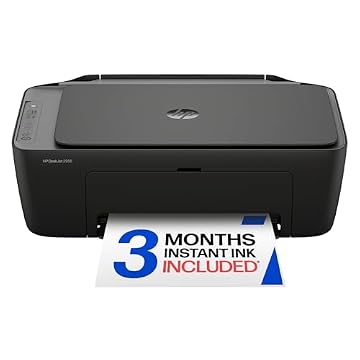
| HP DeskJet 2955 Wireless All-in-One | Basic household tasks with automated ink restocking | Includes a 3-month trial of Instant Ink and AI-capable features |
| Best-for-home | Multi-page copying and administrative document scanning | Features an auto document feeder and a slightly larger 1.8-inch display |
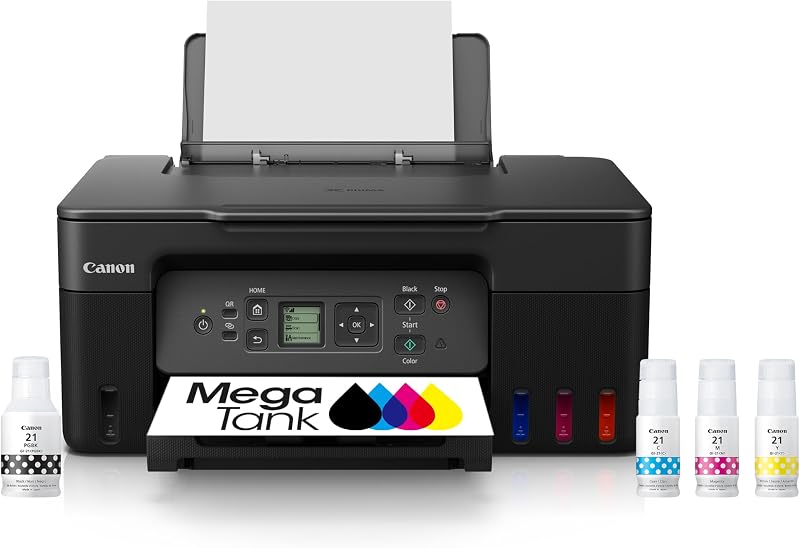
| High-volume continuous printing without cartridges | Utilizes a refillable MegaTank reservoir system for high-volume output |
Deciding between these units depends primarily on your document volume and media handling habits. If you need automated multi-sheet scanning, the Best-for-home Brother unit provides a document feeder that the TS6420a lacks. If keeping consumable refills minimal over massive print batches is your priority, the Print Canon MegaTank G3270 offers refillable bulk reservoirs. However, if your goal is an ultra-compact machine that effortlessly swaps between envelopes, card stock, and standard double-sided office paper, the Canon PIXMA TS6420a provides the most balanced dual-feed mechanism in its footprint. For an alternative take on value-oriented desktop inkjets, consider evaluating the hp deskjet 2827e wireless all-in-one color inkjet printer, scanner, copier, best-for-home, 3 month i.

08 Bottom Line
When asking is Canon PIXMA TS6420a worth it, the answer hinges on your daily output requirements. For professionals seeking a balanced blend of document clarity, media versatility, and desk-friendly proportions, this printer hits the sweet spot. The inclusion of front and rear trays ensures you spend less time switching out media, while the automated duplexing mechanism cuts down paper usage without user intervention.
While heavy-volume offices may miss having an automatic document feeder for multi-sheet scans, the TS6420a remains an exceptional, low-stress choice for moderate workloads. Its sharp 4800 x 1200 dpi print engine, straightforward 1.44-inch OLED window, and dependable wireless controls deliver a polished, practical tool for any focused home work environment.
09 FAQ
Does the Canon PIXMA TS6420a support automatic double-sided printing?
Yes, the printer includes an integrated auto-duplex feature that automatically flips sheets inside the machine to print on both sides, saving paper without requiring manual intervention.
What paper types can I load into the Canon PIXMA TS6420a?
The printer is officially compatible with plain paper, envelopes, card stock, and glossy photo paper across its front cassette and rear feeding mechanisms.
Can the Canon PIXMA TS6420a scan multiple pages automatically?
No, the unit features a flatbed scanner glass designed for manual, single-sheet scanning and copying; the listing does not specify an automatic document feeder.
How do the front and rear paper trays differ on this model?
The front cassette is primarily designed for standard plain paper document storage, while the rear feed provides a straighter paper path ideal for thicker card stock, envelopes, and photo paper.
Does the Canon PIXMA TS6420a work with voice control systems?
Yes, the printer works with Alexa, enabling voice-activated command integration through compatible smart devices for hands-free utility and status checks.