As Amazon Associates, we earn from qualifying purchases. This means we may receive a small commission at no extra cost to you if you click through and make a purchase.

Desk ergonomics and productivity often run into a persistent conflict: full-size mechanical keyboards provide unmatched tactile feedback and number pad speed, yet their tall switch housings force wrists into an uncomfortable upward bend. For professionals who spend eight to ten hours a day managing data entry, financial modeling, or multi-system communications, thick desktop keyboards create cumulative physical fatigue unless paired with a separate wrist rest. Busy modern desks also demand seamless transitions across laptops, desktop workstations, and mobile devices without tethering users to a maze of desktop cables.
The Keychron K5 Pro solves this balance by pairing an ultra-slim aluminum body with a full 100% layout, offering tactile responsiveness without the bulky footprint of traditional mechanical platforms. In this Keychron K5 Pro review, we examine how its low-profile architecture, open-source firmware, and multi-device wireless pairing perform under heavy office workloads.
01 Quick Verdict
The Keychron K5 Pro is an exceptional low-profile typing platform that gives productivity-focused professionals full mechanical tactile feedback, comprehensive QMK and VIA key customization, and rapid Bluetooth multitasking inside a remarkably thin enclosure.
- Ultra-slim aluminum and ABS construction maintains a low desk profile to reduce wrist strain.
- Full 100% layout with dedicated number pad and low-profile spherical-angled keycaps.
- Onboard QMK and VIA programming allows instant, operating-system-level key remapping.
- Connects with up to three devices via Broadcom Bluetooth 5.1 alongside USB Type-C wired mode.
02 Keychron K5 Pro Features Explained
01 Ultra-Slim Form Factor and Low-Profile Switches
The central mechanical innovation of this keyboard lies in its low-profile switch geometry. The Keychron K5 Pro low profile switches utilize Gateron tactile switches that are 31% slimmer than conventional normal-profile mechanical switches. By drastically trimming switch height, the overall keyboard assembly sits at just 0.93 inches tall, allowing your hands to rest naturally on the desk surface without forcing wrists into extreme upward extension angles. The enclosure marries an aluminum top plate with an ABS plastic bottom housing, delivering structural rigidity across its 16.69-inch full-size frame while keeping total weight manageable for desk mobility.
Because the board features hot-swappable switch sockets, you are not permanently locked into the factory configuration. The supplied Keychron K5 Pro brown switch configuration provides a defined tactile bump at the actuation point, offering physical confirmation for every keystroke without producing the high-frequency acoustic click that can disturb open office spaces. Should your typing preferences shift, the hot-swap capability allows you to swap in compatible low-profile Gateron switches without heating up a soldering iron, making long-term maintenance straightforward.
02 Open-Source Key Customization via QMK and VIA
Advanced workflow efficiency requires customized key placement, and Keychron K5 Pro QMK VIA support provides deep customization. By connecting the keyboard to your workstation using a USB Type-C cable, you can open the VIA web interface or desktop utility to access graphical key remapping. Any key across the 104-key layout can be reassigned to alternate characters, navigation keys, functional shortcuts, or multi-step macros without flashing custom firmware builds manually from the command line.
All remapped configurations and custom macro strings are written directly onto the keyboard onboard memory rather than stored within temporary driver software running in the background. This hardware-level storage ensures that your custom layout carries over instantly whether you plug into Windows, macOS, or Linux computers. For users who also consider compact layouts like the Keychron K3 Pro, having full VIA programmability on a complete 100% layout provides the exact same firmware power alongside a dedicated numeric keypad.
03 Multi-Device Wireless and Wired Connectivity
Modern productivity requires working across multiple machines simultaneously, and Keychron K5 Pro Bluetooth connectivity enables effortless device switching. Powered by Broadcom Bluetooth 5.1, the keyboard stores pairing profiles for up to three independent devices at once. Users can toggle between a primary laptop, a tablet, and a secondary computer via quick key combinations, allowing you to answer messages on a portable device and instantly resume typing reports on your main display.
For settings that forbid wireless peripherals or users who require zero interference during intensive data entry, the hardware includes a physical toggle switch to alternate between wireless mode and a corded USB Type-C connection. The package includes a detachable cable that simultaneously powers the board and enables direct data transmission. This dual-mode design gives you total flexibility between a clean, cable-free office aesthetic and dependable wired stability.
04 LSA Double-Shot PBT Keycaps and Operating System Adaptability
Keycap durability often determines how well a mechanical keyboard holds up under continuous daily typing. The board is outfitted with low-profile spherical-angled, or LSA, double-shot PBT keycaps. The double-shot molding technique fuses two separate layers of plastic, meaning the key legends will never wear down, fade, or rub off after months of heavy typing. The PBT material formulation also resists the greasy, shiny surface buildup common on cheaper ABS keycaps.
Supporting both Keychron K5 Pro Mac and Windows setups out of the box, the keyboard includes dedicated alternate keycaps and a rear hardware toggle switch. Sliding the switch between Mac and Windows modes swaps the layout logic for the top row multimedia keys as well as the bottom row command and alt functions. This dual-system integration makes the hardware an ideal bridge for professionals who use an Apple laptop for creative tasks and a Windows desktop for enterprise management.
05 Customizable Multi-Zone RGB Illumination
Visual clarity in varying ambient office light is managed through an integrated RGB backlight system. The board includes more than 22 distinct RGB backlight animation modes alongside a static white backlight setting for clean, professional office presentation. Users can fine-tune color hue, saturation levels, backlighting brightness, and animation speeds directly from the keyboard without installing cumbersome third-party software.
Because the installed double-shot PBT keycaps feature non-shine-through legends, the RGB lighting reflects around the base of the switches and across the aluminum frame rather than through the lettering. This ambient underglow design creates subtle peripheral lighting around the perimeter of every keycap, enhancing aesthetic appeal in modern workspaces while preventing harsh glare in darker environments.
03 Specs
| Specification | Detail |
|---|---|
| Layout Size | 100% Full-Size (104 Keys, 2 Sections) |
| Switch Type | Gateron Low-Profile Tactile (Brown Switch) |
| Enclosure Materials | Aluminum Top Frame and ABS Plastic Bottom |
| Dimensions | 16.69 inches L x 4.69 inches W x 0.93 inches H |
| Wireless Connectivity | Broadcom Bluetooth 5.1 (Up to 3 Devices) |
| Wired Connectivity | USB Type-C (Corded Electric) |
| Firmware Compatibility | QMK and VIA Support |
| Operating System Support | Windows, macOS, Linux |
| Keycap Profile and Material | LSA Low Profile Double-Shot PBT |
| Backlight Capabilities | RGB (22+ Modes) and Static White Option |
04 Keychron K5 Pro Pros and Cons
Pros
- Ultra-slim aluminum body with low-profile design
- Full 100% layout with dedicated number pad
- Broadcom Bluetooth 5.1 connects up to 3 devices
- QMK and VIA open-source key remapping
- Durable double-shot PBT keycaps
- Hot-swappable tactile brown switches
Cons
- Non-shine-through keycap legends in dark rooms
- Listing does not specify battery milliampere-hour capacity
- Shorter switch travel requires typing adjustment
05 Best Use Cases
- Financial analysts and accountants who need full numeric keypad data entry without the wrist fatigue of tall mechanical keyboards.
- Hybrid professionals running multi-computer workstations who need fast Bluetooth toggling between macOS and Windows devices.
- Software engineers and power users who depend on custom key maps, macros, and layer navigation configured through VIA.
- Office workers in shared desk environments who desire tactile switch feedback without disturbing neighboring colleagues.
06 Before You Buy
Before purchasing, consider how the low-profile mechanical architecture interacts with your desk setup and lighting preferences. While the low-profile Gateron switches provide a comfortable, low-angle typing stance, they use a shorter travel distance than traditional full-height switches. Typing enthusiasts accustomed to deep key presses might require an adjustment period. Additionally, while the double-shot PBT keycaps offer exceptional physical durability and resist fingerprint oils, the listing specifies that the key legends do not allow light shine-through. If you frequently work in complete darkness and rely on glowing alphanumeric legends to see individual keys, the ambient underglow backlighting may not provide sufficient character contrast.
In terms of power management and bundled hardware, the product data indicates the unit runs on corded electric power with one rechargeable battery required for wireless operation. However, the listing does not specify the exact milliampere-hour battery capacity, the wireless operating duration with backlighting active, or the polling rate when connected via Bluetooth. Those who need specialized magnetic switch actuation or ultra-high polling rates for competitive gaming might explore keyboards such as the Keychron Q1 HE 8K, but for office workflows and standard desk productivity, the Keychron K5 Pro specs provide comprehensive functionality.
07 How It Compares With Similar Picks
| Product | Best For | Key Difference |
|---|---|---|
| Keychron K5 Pro | Demanding office ergonomics and macro programming | Low-profile tactile switches, full-size 104-key aluminum build, QMK/VIA support, and Bluetooth 5.1 |
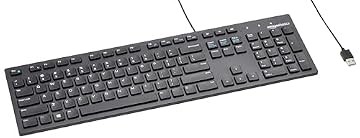
| Amazon Basics Wired QWERTY Keyboard | Basic plug-and-play Windows workstations | Corded USB connection only, standard membrane construction, no wireless pairing or key remapping |
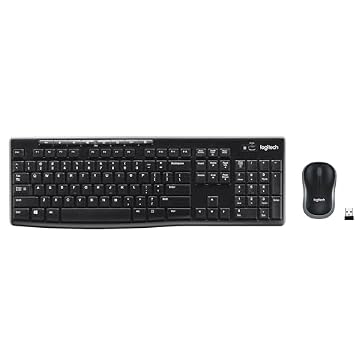
| Full size keyboard with spill-resistant | Budget-friendly desk bundles requiring liquid resistance | Includes wireless mouse, utilizes a dedicated USB-A nano receiver, membrane keys, no VIA firmware |
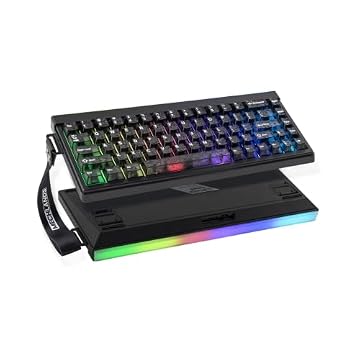
| Creamy Computer Keyboard for PC | Compact setups wanting quiet membrane typing | 68-key compact form factor, membrane structure, 2000mAh battery, carbon fiber style keycaps |
Choosing between these options depends on your workflow requirements, physical desk space, and tolerance for membrane keys versus mechanical switches. If your work relies heavily on high-speed 10-key numeric entry, durable PBT keycaps, and hardware-level key remapping, this model stands well above basic membrane boards. However, if your setup only calls for a simple tethered keyboard without any software setup, a basic entry-level wired board will handle routine word processing. Alternatively, if desktop space is tight and you prefer an ultra-compact footprint with quiet membrane keystrokes, a 68-key board offers minimal desk usage at the expense of a dedicated numeric pad and hot-swappable switches.
08 Bottom Line
Evaluating whether the Keychron K5 Pro is worth it comes down to what you prioritize in daily desktop hardware. For professionals who demand a full 100% layout with dedicated number keys but want to avoid the wrist angle issues associated with high-profile mechanical boards, this keyboard hits a rare sweet spot. The slim 0.93-inch profile, solid aluminum top frame, and hot-swappable tactile switches deliver a refined, ergonomic typing experience that stands up to grueling eight-hour workdays.
When combined with hardware-level QMK and VIA programming and smooth multi-device Bluetooth switching, it provides the versatility required for multi-system office workflows. If you need a premium, slimline typing tool that bridges Mac and Windows environments without cluttering your workspace, this full-size keyboard is an outstanding investment for your desk.
09 FAQ
Is the Keychron K5 Pro good for office work?
Yes, the Keychron K5 Pro for office work offers tactile Gateron low-profile brown switches that provide comfortable tactile feedback without loud clicking noises that distract colleagues. Its low profile also helps reduce wrist strain during long typing sessions, while the dedicated number pad speeds up data entry.
Can I remap keys on both Mac and Windows?
Yes, the board features full QMK and VIA support, enabling users to reconfigure key mappings, layers, and custom macro strings on macOS, Windows, and Linux. Settings are saved directly to the hardware onboard memory when connected via USB Type-C, ensuring configurations persist across operating systems.
How does multi-device Bluetooth switching work?
The keyboard uses Broadcom Bluetooth 5.1 to store up to three separate device profiles simultaneously. You can quickly switch between your desktop computer, laptop, or tablet using simple keyboard shortcuts, making it easy to multitask across several screens.
Are the keycap legends illuminated by the RGB backlighting?
No, the included double-shot PBT keycaps feature non-shine-through legends. The RGB backlighting and static white backlight options illuminate the space around and beneath the keycaps against the aluminum frame, providing ambient underglow rather than backlit letters.
What is the battery life on the Keychron K5 Pro?
The keyboard requires one battery for wireless operation and can also run continuously via USB Type-C corded electric power. However, Keychron K5 Pro battery life specifications such as milliampere-hour capacity or exact wireless operating hours are details the listing does not specify.