As Amazon Associates, we earn from qualifying purchases. This means we may receive a small commission at no extra cost to you if you click through and make a purchase.

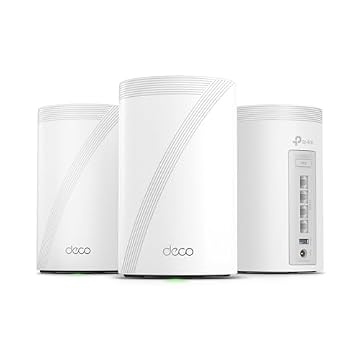
Household networks frequently struggle to maintain consistent signal strength across multiple rooms, resulting in dropped teleconference calls, erratic buffering, and persistent localized dead zones. When modern remote workstations, streaming appliances, and smart devices continuously compete for bandwidth, traditional standalone routers often fail to distribute balanced throughput across thick walls and multi-floor layouts. The TP-Link Deco X55 addresses these connectivity pain points by utilizing an AX3000 mesh architecture designed to deliver uniform, high-speed Wi-Fi 6 coverage across larger living spaces.
For home office professionals and households subscribed to broadband plans up to 1 Gbps, this system provides a practical balance between wireless capacity and physical interface flexibility. Equipped with three Gigabit ports on every hub and integrated network security, it provides dependable whole-home coverage without unnecessary complexity.
01 Quick Verdict
The TP-Link Deco X55 is a balanced mesh networking system that prioritizes multi-room coverage and wired connectivity for Gigabit internet connections. It successfully replaces conventional router-extender setups with a unified wireless environment, supported by accessible mobile management and proactive hardware security standards.
- Includes three auto-sensing Gigabit Ethernet ports per unit for extensive wired device connectivity.
- Delivers Wi-Fi 6 speeds up to 2402 Mbps on 5 GHz and 574 Mbps on 2.4 GHz.
- Provides seamless dual-band coverage across indoor areas reaching up to 4500 square feet.
- Supports high device density with simultaneous stability for up to 150 connected clients.
02 TP-Link Deco X55 Features Explained
01 Three Gigabit Ethernet Ports and Wired Backhaul
Hardware port availability is often a limiting factor on compact mesh nodes, but the TP-Link Deco X55 avoids this compromise by integrating three full Gigabit Ethernet ports on every tower. Across the two-pack bundle, users gain access to six total Gigabit ports. Every port features automatic WAN and LAN sensing, meaning any unit can plug directly into your service provider modem as the primary gateway, while the remaining ports remain available for physical office equipment.
This physical arrangement allows remote workers to hardwire critical workstations, printers, and network storage without needing to purchase an auxiliary network switch or deploy a specialized deco x50 poe setup. Furthermore, the architecture supports tp-link deco x55 ethernet backhaul. By linking remote nodes using structured in-wall cables, backhaul data travels over physical wire rather than wireless bands, delivering optimal speed and minimal latency for high-stakes business conferences.
02 Dual-Band Wi-Fi 6 AX3000 Performance
The wireless platform operates on Wi-Fi 6 architecture, providing cumulative bandwidth rated at AX3000. This is partitioned into two distinct frequency bands: a 5 GHz band operating at 2402 Mbps with 160 MHz channel width (2×2/HE160) and a 2.4 GHz band delivering 574 Mbps over 2×2 streams. Support for 160 MHz channels allows compatible client devices to transmit double the data per cycle compared to standard 80 MHz channels, preventing bandwidth saturation during large file transfers.
Running on the ZyNOS operating platform, the internal antennas use beamforming technology to focus radio signals toward active receiving devices rather than distributing power uniformly in all directions. When evaluating deco x55 wifi 6 performance under heavy multi-user loads, the hardware reliably sustains concurrent video streaming, large cloud backups, and smart home reporting. Those examining a broader tp-link deco ax3000 wifi 6 mesh system configuration will appreciate how comfortably this throughput tier services 1 Gbps broadband tiers.
03 Whole-Home Coverage and AI-Driven Roaming
Rated to span up to 4500 square feet in a two-pack arrangement, the system is engineered to overcome physical barriers such as interior framing, brick walls, and multi-floor divisions. To maintain seamless transitions across this footprint, the system implements AI-driven mesh technology. The onboard software actively analyzes network conditions, monitoring client location, traffic demands, and environmental interference to calculate the most efficient routing paths.
The deco x55 coverage functions under a single unified network name (SSID), allowing mobile devices to transition smoothly between nodes without manual network toggling. The automated roaming protocols handle handoffs between access points in the background, preventing audio cutouts during real-time VoIP discussions or live video calls as you walk between rooms. This unified structure removes the sticky client phenomenon that commonly plagues standalone range extenders.
04 Deco App Management and Network Modes
Traditional network administration can be intimidating, but the tp link x55 setup is streamlined through the mobile Deco application for iOS and Android. The setup interface walks users through physical node placement, verifies internet connections, and pairs secondary mesh units in minutes. The app also provides ongoing network oversight, allowing users to view connected device lists, test connection speeds, and toggle guest network access remotely.
Network customization extends to operational modes, enabling administrators to toggle the system between standard Wireless Router Mode and Access Point Mode. In Access Point Mode, the hardware delivers wireless distribution while allowing existing enterprise routers to maintain core gateway and routing tasks. This configuration flexibility makes it straightforward to integrate into a wider tp link deco ecosystem or adapt to complex home office topologies.
05 TP-Link HomeShield and Proactive Security
Security protocols on the system meet current residential and enterprise expectations, featuring WPA-Personal, WPA2-Personal, and modern WPA3-Personal encryption alongside high router firewall protection. Furthermore, TP-Link is a recognized signatory of the U.S. Cybersecurity and Infrastructure Security Agency (CISA) Secure-by-Design pledge, reflecting an institutional commitment to building secure hardware and firmware architectures.
Directly integrated into the operating system is TP-Link HomeShield, which includes core security utilities without extra subscription charges. Users receive Basic Network Security for detecting local network vulnerabilities, Quality of Service (QoS) controls to assign traffic priority to high-importance work computers, and comprehensive Parental Controls. These administrative tools allow users to set time limits, block specific content categories, and pause internet access on managed devices.
03 Specs
| Attribute | Detail |
|---|---|
| Wireless Standard | Wi-Fi 6 (802.11ax/ac/n/a/g/b) |
| Data Transfer Rate | AX3000 (5 GHz: 2402 Mbps; 2.4 GHz: 574 Mbps) |
| Coverage Rating | Up to 4500 sq. ft. (2-pack) |
| Ethernet Ports | 3 Gigabit ports per unit (6 total, WAN/LAN auto-sensing) |
| Connected Device Limit | Up to 150 devices |
| Wireless Security | WPA-Personal, WPA2-Personal, WPA3-Personal |
| Operating System | ZyNOS |
| Antenna Type | Internal antennas with Beamforming |
| Special Features | HomeShield, QoS, Parental Control, Alexa Compatible, WPS, Access Point Mode |
| Power Specification | 12 Volts |
04 TP-Link Deco X55 Pros and Cons
Pros
- Three Gigabit ports on every unit
- Full 160 MHz channel width support
- Covers up to 4500 square feet
- Supports wired Ethernet backhaul
- Handles up to 150 connected devices
Cons
- No multi-gigabit 2.5G ports
- Requires separate standalone modem
- Dual-band without dedicated backhaul
05 Best Use Cases
- Deploying a dependable tp link x55 for home office setups requiring multiple hardwired peripherals connected directly to remote satellite hubs.
- Eliminating wireless dead spots across multi-story residences spanning up to 4500 square feet without using disjointed range extenders.
- Providing stable, coordinated wireless connections for smart households managing up to 150 simultaneous smart home devices and media streamers.
- Creating a reliable wired Ethernet backhaul backbone across properties equipped with internal network cabling to sustain maximum local data transfer speeds.
06 Before You Buy
Before purchasing this mesh system, verify your current internet provider equipment and throughput tiers. The TP-Link Deco X55 is compatible with all leading internet service providers, such as Comcast, Charter, AT&T, Verizon, Xfinity, Spectrum, RCN, Cox, CenturyLink, and Frontier. However, the listing clarifies that an external modem is required for most service providers, meaning this product replaces your wireless router rather than your service line modem or fiber terminal. Furthermore, evaluating deco x55 vs x20 reveals that the X55 delivers faster theoretical wireless transmission alongside three Gigabit Ethernet ports on each unit rather than two, providing greater peripheral flexibility for crowded home offices.
Shoppers should also take note of physical deployment constraints and package contents. The units utilize internal antennas and operate via an included 12-volt power adapter, but the listing does not specify wall-mounting brackets or outdoor weatherproofing, indicating that placement should remain on flat interior desks, consoles, or bookshelves. In addition, because the LAN ports operate at 10/100/1000 Mbps bandwidth, incoming broadband speeds surpassing 1 Gbps cannot be fully utilized through a single wired interface, keeping this unit best suited for Gigabit and sub-gigabit service plans.
07 How It Compares With Similar Picks
| Product | Best For | Key Difference |
|---|---|---|
| TP-Link Deco X55 | Gigabit home office networks needing multiple wired ports | Dual-band Wi-Fi 6 AX3000, 3 Gigabit ports per node, 4500 sq. ft. coverage |
| Up to 6,600 Sq.Ft | Expansive properties requiring next-generation Wi-Fi 7 speeds | Dual-band BE5000 Wi-Fi 7, 3-pack covers up to 6600 sq. ft., two 2.5G ports per node |
| 4 x 2.5G Ports Wired | Large estates demanding multi-gigabit routing and tri-band support | Tri-band BE10000 Wi-Fi 7, 3-pack covers up to 7600 sq. ft., four 2.5G ports per node |
When deciding between these options, prioritize your property size and internal network infrastructure. If your living space exceeds 6000 square feet or your internet plan exceeds 1 Gbps, selecting the Up to 6,600 Sq.Ft configuration provides modern Wi-Fi 7 capabilities and dual 2.5G wired backhaul ports. For power users with demanding internal server transfers and sprawling square footage, the 4 x 2.5G Ports Wired option delivers a high-capacity tri-band architecture with four 2.5G ports on each unit, while the TP-Link Deco X55 remains the focused, reliable choice for standard Gigabit broadband.

08 Bottom Line
Synthesizing this tp link x55 review, the platform serves as a dependable networking foundation for remote professionals who need steady connectivity, strong multi-device capacity, and physical Ethernet options without unnecessary complexity. Its allocation of three Gigabit ports per node directly eliminates peripheral crowding, while the AX3000 Wi-Fi 6 engine handles simultaneous video conferencing, large file transfers, and smart appliance traffic with minimal latency.
When considering whether is tp link x55 worth it for the modern home office, the inclusion of CISA Secure-by-Design engineering, built-in HomeShield security features, and seamless AI-driven roaming offers solid long-term value. Unless your home infrastructure specifically demands multi-gigabit port interfaces or tri-band wireless channels, this two-pack configuration offers an exceptional combination of coverage and reliability.
09 FAQ
What are the primary tp link x55 specs to consider before buying?
Core tp link x55 specs include dual-band Wi-Fi 6 speeds up to 2402 Mbps on 5 GHz (HE160) and 574 Mbps on 2.4 GHz, three auto-sensing Gigabit Ethernet ports per node, 4500 square feet of coverage for the two-pack, and support for up to 150 connected devices.
Does the TP-Link Deco X55 replace my existing internet modem?
No, the Deco X55 is a mesh wireless router system, not a modem. The listing notes that an external modem is required for most internet service providers, which connects to the main Deco node using an Ethernet cable to provide WAN internet access.
Can any TP-Link Deco X55 node be configured as the primary router?
Yes, any Deco X55 unit can operate as the primary router. Each node is equipped with auto-sensing Gigabit Ethernet ports that automatically determine whether a connected cable represents incoming WAN internet traffic or outbound local LAN traffic.
How does the Deco X55 handle wired Ethernet backhaul?
The system natively supports wired Ethernet backhaul. You can connect satellite Deco X55 units directly to the primary router or an intermediate switch using physical Ethernet cabling, offloading mesh backhaul traffic from the wireless channels for maximum stability.
Does the TP-Link Deco X55 support voice assistant control?
Yes, the Deco X55 includes Alexa compatibility. By enabling the Deco skill within your Amazon Alexa account, you can perform basic network commands, such as enabling the guest Wi-Fi network or inspecting system activity, using simple voice instructions.
What security and parental control features are included without extra fees?
The platform includes TP-Link HomeShield baseline security at no additional cost. This provides Basic Network Security scanning to detect vulnerabilities, Quality of Service (QoS) controls to prioritize critical devices, and Parental Controls for setting bedtime schedules and managing web filters.