As Amazon Associates, we earn from qualifying purchases. This means we may receive a small commission at no extra cost to you if you click through and make a purchase.

Commercial design studios, architectural consultants, and on-site event managers often face a common bottleneck when producing tangible visual assets: standard multi-function office units are optimized for text documents rather than specialized imagery. When client presentations or project sign-offs demand physical photographic proofs, relying on large office printers frequently leads to awkward margin cropping, inconsistent color reproduction, and wasted paper stock. The Epson PictureMate PM-400 addresses this operational friction by functioning as a dedicated, compact photo printer that generates edge-to-edge physical prints directly at your workstation.
For busy professionals evaluating the hardware, the verdict is decisive: this compact inkjet printer excels in workflows that require fast, borderless 4-by-6 or 5-by-7 prints without consuming valuable desk territory. However, because it relies on a single paper tray, a specialized CMYBK ink setup, and strict manufacturer cartridge validation, it cannot serve as a high-capacity office workhorse. If your business prioritizes general letter-size document printing and high-yield bulk ink reservoirs, a generalist unit like the epson ecotank et-2800 wireless color all-in-one supertank printer is a better fit. For targeted, on-demand photographic output, the PM-400 offers an efficient, mobile-ready solution.
01 Quick Verdict
The Epson PictureMate PM-400 provides quick, reliable photo printing in a remarkably portable package, making it an excellent secondary printer for desktop proofing and immediate photo distribution.
- Prints borderless 4-by-6 inch photos in as fast as 36 seconds.
- Ultra-compact 6-pound design saves critical desk real estate.
- Direct wireless workflow supported for iOS, Android tablets, and smartphones.
- Exclusive compatibility with genuine Epson cartridges enforced via firmware.
02 Epson PictureMate PM-400 Features Explained
01 Dedicated Photo Output and Borderless Printing

The primary appeal of this printer is its targeted focus on small-format photographic imagery. Unlike traditional office printers that treat photo paper as an afterthought, the hardware is built specifically to handle glossy photo paper media. The epson pm-400 borderless printing feature accommodates both 4-by-6 inch and 5-by-7 inch dimensions, delivering edge-to-edge imagery without white borders or the need for manual trimming. This capability makes it straightforward to hand finished portfolio samples, event keepsakes, or site inspection photos directly to clients.
Regarding long-term display, the listing specifies that prints produced by the system can last up to 200 years under proper storage conditions. When evaluating overall epson pm-400 photo quality, the integrated CMYBK color inkjet architecture produces crisp image definition and vibrant saturation on glossy media. While expansive studio installations might demand wide-format units like the ecotank photo et-8550, the PM-400 provides the necessary fidelity for everyday proofing and client handouts without complex color profile management.
02 Print Speed and Daily Throughput
Speed is critical when incorporating physical printing into an active meeting or presentation. The epson pm-400 print speed is rated to produce a borderless 4-by-6 inch photo in as fast as 36 seconds in default mode on premium glossy photo paper. Because this timing is measured from the start of the paper feed, actual completion intervals will vary based on file complexity, connection type, and host device processing. Nevertheless, the output is fast enough to initiate a print command and have a physical asset ready before a client consultation concludes.
In addition to standard photo jobs, the device includes secondary utility for basic administrative copying. The listing indicates a maximum black-and-white copy speed of 10 pages per minute, paired with a maximum capacity of 50 copies per run. While it is not designed to replace high-speed departmental copiers, this feature allows small offices to quickly duplicate reference documents, forms, or receipts without needing a separate standalone copy machine.
03 Compact Footprint and Portable Build
Desk space is an expensive commodity in professional environments. Measuring 9.8 inches deep, 15.1 inches wide, and 7.9 inches high, the chassis maintains an ultra-compact profile that fits onto side tables, reception counters, or workstation corners. At a total item weight of only 6 pounds, the unit can easily be shifted out of the way when the desk surface is needed for other administrative tasks.
This lightweight construction also allows the hardware to serve in portable or field roles. Event coordinators, pop-up gallery curators, and field evaluators can transport the printer in a standard gear bag. The single-tray design keeps mechanical components contained within the outer frame, ensuring minimal setup time once you arrive at an on-site assignment.
04 Wireless Connectivity and Mobile Workflow
Modern studio workflows frequently bypass desktop computers entirely, capturing images directly on iPads, iPhones, or commercial Android tablets. The epson pm-400 wireless setup provides complete mobile connectivity, allowing users to send print jobs straight from mobile devices using dedicated app control. The integrated iOS controller interface makes printing from Apple devices intuitive and direct, reducing the friction typically associated with network printer configuration.
This wireless flexibility facilitates collaborative work in team environments. Multiple team members or visiting clients can output visual proofs directly from their personal mobile hardware. For high-volume paperwork environments requiring integrated enterprise facsimile routing, a multi-function office tool such as the epson ecotank et-4800 wireless all-in-one cartridge-free supertank printer with scanner, copier, fax is more appropriate, but the PM-400 remains far more streamlined for rapid image printing.
05 Cartridge Lockout and Genuine Ink Requirements
A critical operational consideration for any buyer is the consumables model. The epson picturemate pm-400 ink delivery system uses a CMYBK configuration engineered to function exclusively with genuine Epson cartridges. The product listing clearly indicates that non-genuine, remanufactured, or third-party ink supplies are incompatible and may fail to operate altogether. Furthermore, damage resulting from unauthorized consumables is not covered under the limited warranty.
Epson also distributes periodic firmware updates designed to improve system performance, patch minor bugs, and resolve security issues. The listing notes that these updates actively verify cartridge integrity; consequently, third-party cartridges that worked prior to an update may cease functioning afterward. Teams integrating this printer into their business must plan their operational supply chains around official brand consumables to ensure continuous uptime.
03 Specs
| Attribute | Detail |
|---|---|
| Printer Type | Inkjet |
| Output Type | Color |
| Ink Configuration | CMYBK |
| Print Media Supported | Glossy photo paper |
| Photo Print Sizes | 4″ x 6″ and 5″ x 7″ borderless |
| Print Speed | 4″ x 6″ borderless in as fast as 36 seconds |
| Black & White Copy Speed | Up to 10 pages per minute |
| Maximum Copies Per Run | 50 |
| Dimensions (D x W x H) | 9.8″ x 15.1″ x 7.9″ |
| Item Weight | 6 pounds |
| Input Trays | 1 |
| Connectivity & Control | Wireless, App control, iOS support |
04 Epson PictureMate PM-400 Pros and Cons
Pros
- Fast 36-second 4×6 borderless photo printing
- Lightweight 6-pound compact footprint
- Direct wireless mobile app printing
- Prints resist fading up to 200 years
- Integrated copy function up to 10 ppm
Cons
- Requires genuine Epson ink cartridges exclusively
- Firmware updates can disable third-party ink
- Restricted to 4×6 and 5×7 photo sizes
- Single paper input tray limits versatility
05 Best Use Cases
- Client proofing for visual designers who require fast physical reviews of digital layouts.
- On-site photography stations at corporate events requiring instant 4-by-6 commemorative prints.
- Real estate staging where agents produce polished 5-by-7 property images on demand.
- Small administrative offices needing an occasional portable scanner and basic black-and-white copy utility.
06 Before You Buy
Before purchasing the Epson PictureMate PM-400, verify that your media requirements align with its focused feature set. The epson picturemate pm-400 specs show that this device is engineered around glossy photo paper in 4-by-6 and 5-by-7 inch sizes. It is not intended for standard letter documents, legal forms, or heavy cardstock. Additionally, strict firmware restrictions require the ongoing use of genuine Epson CMYBK ink cartridges, meaning you cannot rely on discount third-party ink cartridges to reduce operating expenses.
The listing outlines a portable scanner feature, single-tray feed mechanism, and app-based wireless controls, but it does not specify whether extra paper packs or computer connection cables are included in the box. To prevent initial setup delays, you should ensure that adequate glossy photo media and replacement genuine ink cartridges are ordered alongside the hardware.
07 How It Compares With Similar Picks
| Product | Best For | Key Difference |
|---|---|---|
| Epson PictureMate PM-400 | Dedicated 4″x6″ & 5″x7″ desktop photo printing | Compact 6 lb frame, 36-second photo speed, genuine cartridge requirement |
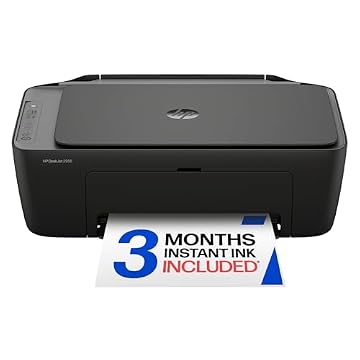
| HP DeskJet 2955 Wireless All-in-One | General home office document management | Traditional all-in-one build, Instant Ink trial, AI-capable features |
| Cost Efficient Multi-Function Photo Printer | General multi-function color home printing | Canon PIXMA TS4320 platform featuring print, copy, and scan utilities |
| High-volume corporate office environments | HP Color LaserJet Enterprise 4701dw with enterprise security and fast laser speeds |
Select an alternative if your daily responsibilities center on standard full-page text documents or multi-page administrative jobs. If you require an economical all-in-one printer for basic document printing, copying, and scanning, consider the HP DeskJet 2955 Wireless All-in-One or the Cost Efficient Multi-Function Photo Printer. If your team manages high-volume commercial runs with rigorous network compliance requirements, the Print enterprise laser printer is far more suitable than a compact photo specialist.

08 Bottom Line
Deciding whether the epson pm-400 printer is worth it comes down to how heavily your daily business relies on small-format visual assets. If you routinely need physical 4-by-6 or 5-by-7 glossy prints for client meetings, portfolios, or on-site visual records, this lightweight unit provides rapid, high-quality output without cluttering your workspace. The 36-second print speed and dependable mobile wireless integration make it an exceptionally capable photo specialist.
However, if you expect an all-purpose machine capable of handling routine document workflows, wide-format media, or cheap alternative consumables, the single tray and strict genuine ink policies will prove limiting. When deployed strictly for its intended purpose—compact, on-demand desktop photo printing—the PM-400 is an efficient, space-saving tool.
09 FAQ
How fast does the printer complete a 4-by-6 borderless print?
The printer can produce a borderless 4-by-6 inch photo in as fast as 36 seconds when operating in default mode on glossy photo paper, though actual times vary based on system setup and image complexity.
Can you use third-party ink cartridges in this printer?
No, the system is designed exclusively for genuine Epson cartridges. Non-genuine or altered cartridges may not function, and automated firmware updates can permanently disable third-party ink supplies.
What photo sizes are supported for borderless printing?
The printer is engineered to produce borderless color prints in 4-by-6 inch and 5-by-7 inch sizes on glossy photo paper.
Does the printer connect directly to mobile phones and tablets?
Yes, the hardware includes total wireless connectivity with dedicated app support, enabling direct printing from iPhones, iPads, and Android mobile devices.
Can this printer handle black-and-white document copies?
Yes, the device offers black-and-white copy speeds of up to 10 pages per minute and can execute batches of up to 50 copies per run.