As Amazon Associates, we earn from qualifying purchases. This means we may receive a small commission at no extra cost to you if you click through and make a purchase.

Commercial crafters, boutique design studios, and merchandise producers frequently run into operational bottlenecks when juggling diverse materials across tight project schedules. Switching between separate dedicated plotters for adhesive films, garment graphics, tooling leather, and packaging prototypes clutters workbenches and drags down output efficiency. High-output creators need a unified desktop fabrication platform with the torque and drive precision to cut both delicate papers and dense structural media cleanly. The primary appeal of an industrial-grade cricut maker machine centers on bringing versatile tooling and wide media compatibility into a single automated workstation. The Cricut Maker 4 enters the market targeting these production demands by expanding compatible substrates to over 300 materials while cutting at speeds up to two times faster than its previous generation counterpart.
For independent apparel decorators, stationery makers, and custom gift enterprises, this smart cutting machine delivers the mechanical rigidity, feeding velocity, and multi-function capabilities required to scale short-run output. While shop owners must accommodate its substantial desk footprint and ongoing reliance on cloud-linked software, its ability to slice, deboss, engrave, and score across dense and thin media makes it a formidable asset for serious production environments.
01 Quick Verdict
The Cricut Maker 4 is a multi-material fabrication workhorse that balances accelerated throughput with detailed cut accuracy, making it an excellent investment for commercial crafters and small business studios seeking to expand product offerings beyond basic vinyl decals.
- Cuts more than 300 materials ranging from thin films to genuine leather and craft wood.
- Delivers up to two times faster cutting speeds compared to the previous model.
- Ships with a complete starter kit including blades, mats, tools, and material samples.
- Occupies a large physical footprint and weighs 9.59 kilograms, requiring permanent tabletop space.
02 Cricut Maker 4 Features Explained
01 Expanded Multi-Material Cutting and Tool Versatility
The defining capability of this unit is its extensive cricut maker multi material cutting capacity. Where standard hobby plotters struggle on media thicker than cardstock, this platform processes over 300 different substrates. Operators can transition seamlessly between cutting delicate crepe paper, standard adhesive films, heavy heat transfer vinyl, thick tooling leather, chipboard, and craft balsa wood. The automated carriage applies calibrated downward pressure to slice cleanly through dense fibrous grains without tearing edges or stalling midway through intricate curves.
In addition to basic perimeter cutting, the tool carriage accommodates interchangeable heads to turn the unit into an all-in-one finishing center. The machine draws, foils, scores, debosses, engraves, and perforates. Operators can engrave customized metal blanks for pet tags or jewelry, create debossed leather branding patches for custom headwear, crease dimensional packaging prototypes with scoring wheels, or generate tear-away coupons using perforation tools. Consolidating these fabrication modes into one platform eliminates the necessity of maintaining separate manual presses and punches.
02 High-Efficiency Production Speed and Feeding Mechanics
Fulfilling client batches and replenishing seasonal stock requires dependable velocity. This cricut maker smart cutting machine operates up to two times faster than the previous generation cutter when processing compatible materials. The automated drive system coordinates high-speed roller advancement with rapid directional blade rotation, executing complex decorative flourishes and tight geometric lines without sacrificing dimensional accuracy.
The machine supports both traditional cutting mats and continuous matless feeding using the included Smart Vinyl and Smart Iron-On samples. Matless feeding bypasses the manual step of measuring, adhering, and burnishing material sheets onto adhesive mats before every operation. This allows business owners to feed continuous rolls directly into the rollers for extended signage runs, tall wall graphics, and oversized banners, significantly reducing turnaround times on high-volume cut files.
03 Full-Color Sticker Production via Print-Then-Cut
Creating branded product packaging, illustrated decals, and decorative labels demands clean multi-color graphics paired with exact edge trimming. The cricut maker print then cut function bridges digital graphic printing with automated contour cutting. Creators produce artwork within the software, send the file to an external inkjet printer, and load the printed page directly into the cutter. The machine uses internal optical sensors to scan printed registration marks, calculating the exact spatial orientation of the page before directing the blade around the printed contours.
The listing confirms compatibility with most standard inkjet printers, making this system a straightforward addition to existing studio print setups. The optical scanning array compensates for minor sheet skewing during loading, ensuring that finished die-cut stickers and kiss-cut sticker sheets retain uniform border margins without accidental graphic clipping.
04 Digital Design Space Software Integration
All file preparation, project scaling, and tool assignments take place inside the cricut design space software application. Available for desktop and mobile operating systems, the software allows creators to upload custom vector artwork or assemble graphics using built-in typography and shape tools. The standard free catalog provides access to more than 3,000 graphics and 100 typefaces, giving operators immediate creative assets from the day of machine setup.
For studios seeking an expanded graphic pipeline, an optional paid Cricut Access subscription unlocks more than 1.5 million graphics, 1,000 curated fonts, and over 100,000 ready-to-make projects. Furthermore, this bundle includes 30 bonus digital images ready to claim upon product registration, equipping small businesses with commercial-friendly assets without requiring initial graphic licensing expenses.
03 Specs
| Attribute | Detail |
|---|---|
| Brand | Cricut |
| Model Number | 8002707 |
| UPC | 093573727863 |
| Dimensions (D x W x H) | 7.1 x 22.1 x 6.2 inches |
| Active Surface Area | 270.25 square inches |
| Machine Weight | 9.59 kg |
| Housing Material | Plastic |
| Operation Mode | Automatic |
| Material Compatibility | 300+ materials (leather, wood, vinyl, iron-on, cardstock) |
| Included Cutting Tool | Fine-Point Blade |
| Hardware Compatibility | Most inkjet printers |
04 Cricut Maker 4 Pros and Cons
Pros
- Cuts 300+ materials including leather and wood
- Operates up to 2X faster than predecessor
- Compatible with inkjet printers for Print-Then-Cut
- Supports matless cutting with Smart Materials
- Includes material sampler and 30 digital images
Cons
- Substantial 9.59 kg weight requires dedicated space
- Exterior housing is plastic
- Full digital asset library requires paid subscription
- Listing does not specify print media limits
05 Best Use Cases
- Custom apparel brands manufacturing high-volume iron-on transfers and layered heat transfer vinyl graphics.
- Stationery and sticker businesses pairing the machine with inkjet printers to produce professional die-cut sticker sheets.
- Boutique leather workshops debossing custom patches, wallets, and structural leather accessories.
- Jewelry and gift designers engraving personalized text and designs into soft metal blanks.
- Event production studios building multi-layered cardstock decor, architectural party favors, and oversized vinyl signage.
06 Before You Buy
Before bringing this system into a professional workflow, ensure your computing hardware and peripherals match the machine requirements. Operating the cutter requires an active device running the Cricut Design Space application, and print-then-cut functionality requires a separate inkjet printer, as the cutter itself does not lay down ink. While earlier models like the cricut explore air 2 machine relied heavily on physical mats for all processes, this updated machine utilizes matless smart materials alongside traditional mats. The cricut maker bundle comes equipped with a Fine-Point Blade, Light Grip Mat, weeding tool, fine-point pen, digital content, and material samples, but specialized accessories for engraving, debossing, and wood slicing must be purchased separately as project needs dictate.
Physical spatial requirements must also be planned carefully. Weighing 9.59 kilograms and measuring over 22 inches across, the machine needs a stable, level table with open clearance both behind and in front of the unit to allow long materials and cutting mats to travel unhindered. When organizing a commercial studio alongside office amenities like a ge opal mini, ensure crafting surfaces are dedicated solely to production equipment. Note also that the product listing does not specify print media limits, wireless Bluetooth versions, or precise cutting force in grams, so businesses handling niche industrial substrates should verify material thicknesses before starting large-scale production runs.
07 How It Compares With Similar Picks
| Product | Best For | Key Difference |
|---|---|---|
| Cricut Maker 4 | Multi-material commercial production | Handles 300+ materials with 2X cutting speed and broad multi-tool support |
| VEVOR Vinyl Cutting Machine | 12-inch basic vinyl and cardstock signage | Manual button-controlled interface featuring 20,000+ built-in design resources |
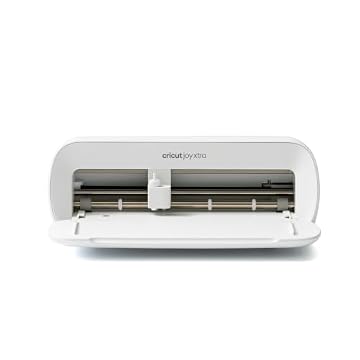
| Includes 30 images in Design | Compact desktop crafting and micro-stickers | Ultra-compact Cricut Joy Xtra profile optimized for small workstations |
| Brother SDX125E ScanNCut Electronic Cutting | Direct hand-drawn and printed scanning | Integrates an onboard optical scanner for standalone operation without a computer |
Choosing between these cutting systems comes down to material density, workspace constraints, and software preferences. When weighing the cricut maker vs joy xtra, creators with limited desktop real estate will appreciate the Joy Xtra for quick cards and modest vinyl decals, whereas the Maker 4 is required if your business cuts heavy wood, thick leather, or metal blanks. If your workflow centers strictly on wide adhesive vinyl lettering and you prefer manual physical controls over software-guided profiles, the VEVOR vinyl cutter serves as a basic alternative. For studios that prioritize standalone drafting and digitizing hand-drawn artwork directly on the machine without connecting to external computers, the Brother ScanNCut offers built-in scanning hardware.
08 Bottom Line
Evaluating the cricut maker 4 specs demonstrates that this machine is engineered for serious production efficiency rather than casual hobby use. By pairing two-times faster cutting velocity with the structural capacity to handle more than 300 materials, it delivers the consistency and versatility required to scale an independent craft enterprise. Whether your business focuses on custom apparel, commercial packaging, engraved metal jewelry, or custom sticker collections, the machine handles complex multi-step jobs with high precision.
Is cricut maker worth it for your business? If you operate a dedicated craft studio and need a heavy-duty smart cutting machine that eliminates the boundaries between paper, vinyl, wood, and leather fabrication, adopting the Cricut Maker 4 for small business workflows is a logical, high-return decision that expands your merchandise catalog immediately.
09 FAQ
What materials can the Cricut Maker 4 cut?
The unit is engineered to cut over 300 materials, including delicate crepe paper, cardstock, adhesive vinyl, heat transfer vinyl, genuine tooling leather, chipboard, and craft balsa wood. Paired with appropriate toolheads, it also engraves soft metals, debosses, scores, and perforates.
What accessories come inside the digital content bundle?
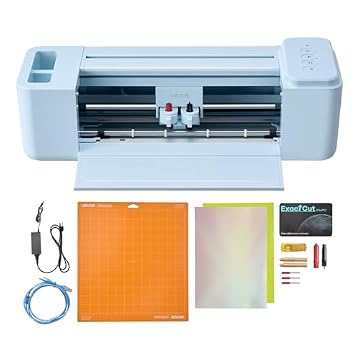
The bundle includes the smart cutting machine in Seashell, a Fine-Point Blade, a Fine Point Pen, a Light Grip Mat, a weeder tool, 30 digital images in the Design Space software, and a materials sampler containing Smart Vinyl, Matless Vinyl, Smart Iron-On, Matless Heat Transfer Vinyl, Cardstock, and Transfer Tape.
How does the Print-Then-Cut system operate?
You design or upload full-color graphics into the Design Space software, print them on a standard home or commercial inkjet printer with registration marks, and feed the printed sheet into the cutter. The machine’s optical sensors detect the printed marks and trim cleanly around the perimeter of each design.
Do I need a paid subscription to run the machine?
No, the core Design Space software is free to download and use for designing, uploading your own vector files, and cutting. It includes over 3,000 free images and 100 fonts. An optional paid Cricut Access subscription is available if you wish to unlock a wider library of over 1.5 million images and 1,000 fonts.
What are the dimensions and weight of the unit?
The machine measures 7.1 inches deep, 22.1 inches wide, and 6.2 inches high, providing 270.25 square inches of active surface area. It weighs 9.59 kilograms, requiring a solid, dedicated work surface with ample clearance front and back.