As Amazon Associates, we earn from qualifying purchases. This means we may receive a small commission at no extra cost to you if you click through and make a purchase.
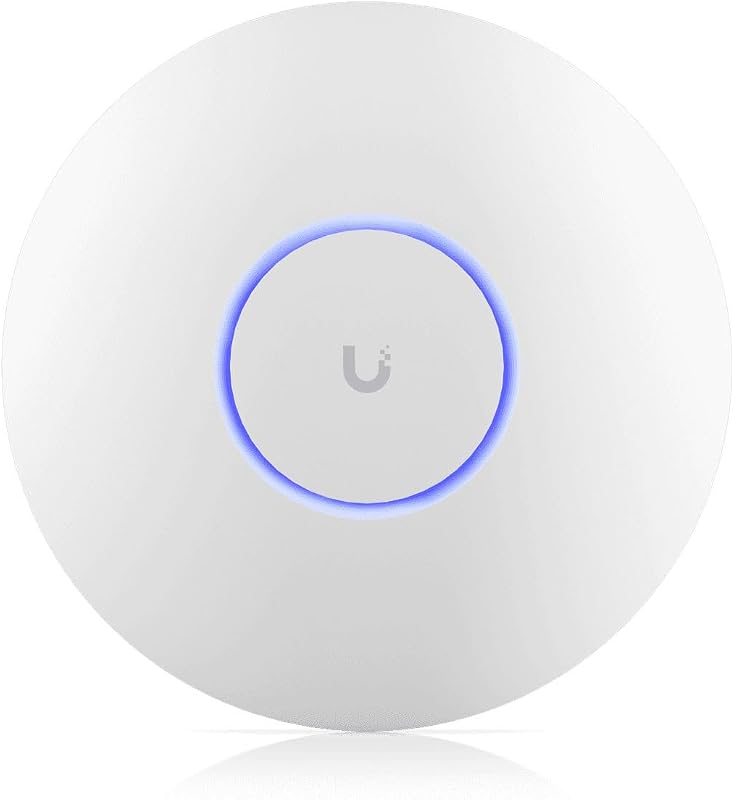
Modern corporate offices and dense technical workspaces frequently suffer from wireless spectrum congestion, latency spikes, and signal degradation as hundreds of employee laptops, mobile devices, and peripherals compete for airtime. Standard dual-band routers and entry-level access points struggle to sustain high data rates under heavy concurrent demand, creating frustrating connectivity bottlenecks during collaborative work hours. The Ubiquiti UniFi U7 Pro Max directly targets these workplace friction points by pairing tri-band Wi-Fi 7 wireless throughput with a dedicated background radio frequency monitoring engine designed for demanding, large-scale enterprise environments.
Choosing an enterprise-ready ubiquiti wifi 7 access point allows organizations to transition from reactive troubleshooting to dependable high-speed stability. With multi-gigabit throughput reaching up to 8.60 Gbit/s, 8 spatial streams, and support for the clean 6 GHz spectrum, this ceiling-mounted unit provides the bandwidth and airtime efficiency necessary for high-density modern workplaces. While smaller branch offices with minimal wireless traffic might find these enterprise features more than their daily operations require, medium-to-large business environments will find its balance of throughput and continuous radio frequency oversight an exceptional operational asset.
01 Quick Verdict
The Ubiquiti UniFi U7 Pro Max is an enterprise-grade tri-band access point that successfully eliminates device congestion by combining Wi-Fi 7 speeds, extensive multi-user stream handling, and an independent spectral analysis radio. For organizations managing bandwidth-heavy office floors with high client densities, it provides a stable, future-proof wireless foundation.
- Tri-band radio coverage across 2.40 GHz, 5 GHz, and 6 GHz reaching up to 8.60 Gbit/s aggregate speeds
- Dedicated spectral scanning engine engineered for zero-disruption radio frequency interference monitoring
- Dense 8 spatial streams architecture featuring Multi User MIMO technology
- Multi-gigabit 2.5 Gigabit Ethernet backhaul port to prevent wired uplink bottlenecks
02 Ubiquiti UniFi U7 Pro Max Features Explained
01 Tri-Band Wi-Fi 7 and Clean 6 GHz Channels
The core capability of this access point is its comprehensive tri-band radio configuration spanning 2.40 GHz, 5 GHz, and 6 GHz frequencies. By leveraging the IEEE 802.11be Wi-Fi 7 standard alongside backward compatibility for older 802.11a/b/g/n/ac/ax protocols, the unit achieves a maximum aggregate throughput of 8.60 Gbit/s. Taking full advantage of the unifi u7 pro max 6 ghz spectrum allows modern client hardware to bypass the crowded airwaves of older bands, opening up ultra-wide channels with minimal latency for heavy file transfers, cloud backups, and high-definition video conferencing.
In addition to raw throughput, Wi-Fi 7 modulation delivers improved data packing efficiency across all supported frequencies. This ensures that even when older legacy devices remain connected to the 2.40 GHz or 5 GHz bands, newer production laptops utilizing the 6 GHz band experience uninterrupted data rates without competing for legacy airtime allocations.
02 High-Capacity 8 Spatial Streams Architecture
Rather than relying solely on single-stream performance, the hardware utilizes a robust u7 pro max spatial streams array delivering 8 total streams across its radio bands. Paired with Multi User MIMO (MU-MIMO) technology, this configuration allows the access point to communicate with multiple client devices at the same physical instant. Instead of placing active clients into sequential queues, the access point divides transmission loads across parallel data paths.
Deploying the unifi 7 pro max for office workstations prevents the common issue of network slowdowns caused by dense device groupings. In crowded boardrooms or open-plan seating layouts, the multi-stream design ensures consistent signal quality and steady throughput, keeping background software updates and bandwidth-hungry collaboration tools from degrading overall office connectivity.
03 Dedicated Spectral Scanning Engine
In high-density commercial spaces, ambient radio frequency interference from neighbouring networks, Bluetooth equipment, and commercial appliances can quickly degrade wireless stability. The unit addresses this through integrated u7 pro max spectral scanning, utilizing an independent, dedicated spectral scanning engine that constantly sweeps the surrounding RF environment. Because this engine is completely separate from client-serving radios, it monitors interference patterns continuously without disconnecting active users or causing momentary packet drops.
Ubiquiti notes that real-time spectral analysis requires UniFi Network version 8.2.93 and later. Once integrated with the management software, network administrators gain live diagnostic visibility into spectrum utilization and channel congestion, allowing for intelligent channel assignments and automated interference mitigation during busy business hours.
04 Multi-Gigabit 2.5G Uplink Port
High wireless aggregate bandwidth is ineffective if the underlying wired infrastructure restricts data flow. To solve this backhaul challenge, the access point features a 2.5 Gigabit Ethernet port alongside standard Gigabit Ethernet network connectivity over an RJ-45 interface. This u7 pro max 2.5g uplink ensures that multi-gigabit wireless transmissions across the 5 GHz and 6 GHz bands flow into core switches without meeting a 1 Gbps wired bottleneck.
Operating these multi-gigabit radios and the dedicated scanning engine requires sufficient power delivery. The access point has a maximum power consumption rating of 25 W delivered over its network connection. Facilities deploying this access point must ensure their switching infrastructure or PoE injectors provide adequate wattage overhead to maintain uninterrupted peak wireless performance.
05 Unified Enterprise Management and Setup
Managed through Ubiquiti’s central UniFi OS, the hardware operates in Access Point Mode to provide seamless multi-site visibility, client traffic inspection, and security policy enforcement. A standard unifi 7 pro max setup takes place quickly through the management software, allowing network engineers to configure multiple SSIDs, client isolation policies, and enterprise VLAN segmentation with minimal friction. Pairing this access point with central routing consoles like the udm pro max provides complete visibility from core gateway routing down to individual spatial stream metrics.
For organizations already operating an enterprise gateway such as the unifi dream machine pro, managing this access point requires no additional recurring software licensing fees. The unified management console consolidates spectral graphs, connected client lists, and firmware maintenance into a single pane of glass, streamlining routine network administration tasks.
03 Specs
Reviewing the formal unifi 7 pro max specs from the manufacturer reveals hardware optimized for high-throughput commercial ceiling or wall installations.
| Specification Attribute | Listing Detail |
|---|---|
| Item Model Number | U7-PRO-MAX-US |
| Manufacturer | Ubiquiti Inc. (Ubiquiti Networks) |
| Wireless Standards | IEEE 802.11a/b/g/n/ac/ax/be/k/r/v (Wi-Fi 7) |
| Frequency Bands | Tri-Band (2.40 GHz, 5 GHz, 6 GHz) |
| Maximum Throughput | 8.60 Gbit/s |
| Spatial Streams | 8 Spatial Streams |
| MIMO Technology | MIMO Technology, Multi User MIMO |
| Network Interface | 1 x RJ-45 (2.5 Gigabit Ethernet, Gigabit Ethernet) |
| Power Consumption | 25 W |
| Operating System / Mode | UniFi OS (Access Point Mode) |
| Product Dimensions | 1.8 x 1.8 x 2.6 inches |
| Item Weight | 1.5 pounds |
| Mounting Options | Wall Mountable, Ceiling Mountable |
04 Ubiquiti UniFi U7 Pro Max Pros and Cons
Pros
- Tri-band support including clean 6 GHz spectrum
- Dedicated spectral scanning engine for live diagnostics
- High aggregate wireless speed up to 8.60 Gbit/s
- Eight spatial streams with Multi User MIMO
- Fast 2.5 Gigabit Ethernet uplink port
Cons
- Requires UniFi Network version 8.2.93 for spectral analysis
- High 25-watt power consumption requires capable PoE
- Listing does not specify included PoE power injector
05 Best Use Cases
- High-density corporate office floors where dozens of employees run concurrent video meetings, cloud syncs, and large data transfers simultaneously.
- Creative design and video production facilities needing high-bandwidth internal Wi-Fi 7 channels to transfer substantial media files across local network storage.
- Commercial office buildings suffering from heavy external radio interference where continuous background spectral scanning keeps channels optimized.
- Enterprise IT deployments standardized on multi-gigabit switching backbones requiring a 2.5G wired uplink to eliminate network backhaul choke points.
06 Before You Buy
Before purchasing this access point, evaluate your physical network switching infrastructure to ensure proper power and speed compatibility. The unit demands up to 25 W of power, which requires a robust Power over Ethernet switch capable of delivering this wattage. Regarding what comes in the box, the product listing specifies only the U7 Pro Max Wireless Access Point along with a wall and ceiling mount. The listing does not specify whether a standalone PoE power injector, external power supply, or network patch cables are included, so buyers without PoE-enabled switches will need to source their own power hardware.
Additionally, take note of the software requirements needed to unlock its full feature set. Ubiquiti specifically notes that real-time spectral analysis requires UniFi Network version 8.2.93 and later. If your management controller runs on an older software branch, you must update the application before the dedicated background scanning tools become functional. Ensure your management appliance has sufficient software support before initiating the hardware deployment.
07 How It Compares With Similar Picks
| Product | Best For | Key Difference |
|---|---|---|
| Ubiquiti UniFi U7 Pro Max | High-density corporate spaces needing tri-band Wi-Fi 7 and continuous RF scanning | Tri-band 8.60 Gbit/s with 8 spatial streams, 6 GHz band, and dedicated spectral analysis |
| WiFi 7 Dual Band | Omada-managed networks needing dual-band Wi-Fi 7 with a bundled power adapter | BE5000 dual-band design managed via Omada platform, with 5-year warranty and included DC adapter |
| Desktop WiFi Bridge | Simple desktop extensions or basic dual-band range extension tasks | Older AC1200 Wi-Fi 5 dual-band standard with 4 fixed antennas and desktop form factor |
| Ubiquiti UniFi nanoHD Compact 802.11ac | Smaller legacy UniFi installations requiring compact Wi-Fi 5 coverage | Older 802.11ac Wave 2 standard without 6 GHz support or dedicated spectral scanning |
Selecting an alternative depends largely on your existing ecosystem and throughput requirements. If your network infrastructure is already built on TP-Link Omada hardware and you require dual-band Wi-Fi 7 with an included DC power supply, the WiFi 7 Dual Band provides an appropriate alternative. If you only require a basic, low-cost wireless link for a desktop workstation without ceiling mounting, the Desktop WiFi Bridge offers straightforward client bridging on older Wi-Fi standards. Meanwhile, organizations maintaining older UniFi setups that do not need Wi-Fi 7 speeds or spectral diagnostics can deploy the Ubiquiti UniFi nanoHD Compact 802.11ac, though it lacks the 8-stream capacity and 2.5G multi-gigabit uplink found on the modern flagship.

08 Bottom Line
When deciding whether is unifi 7 pro max worth it for your organization, the decision hinges on device density, bandwidth requirements, and radio frequency management needs. With its tri-band Wi-Fi 7 radio array delivering up to 8.60 Gbit/s aggregate capacity across 2.40, 5, and 6 GHz frequencies, this unit easily resolves traffic congestion in heavily populated workspaces. Its 8 spatial streams and multi-user MIMO capabilities maintain responsive communication channels even during peak enterprise operating hours.
The addition of a dedicated spectral scanning engine further solidifies its position as a high-tier corporate access point, offering continuous background interference analysis without disturbing client connections. While small offices with light network demands may not need this level of capacity, businesses looking for a future-proof, high-performance wireless deployment will find the Ubiquiti UniFi U7 Pro Max an outstanding and dependable investment.
09 FAQ
Does the access point require a specific UniFi software version for spectral scanning?
Yes. The manufacturer specifies that real-time spectral analysis requires UniFi Network version 8.2.93 and later. Administrators must update their UniFi controller to this version or newer to use the dedicated RF scanning tools.
What wireless frequencies does this unit support?
The access point supports tri-band operation across 2.40 GHz, 5 GHz, and 6 GHz frequencies. It is compatible with IEEE 802.11a/b/g/n/ac/ax/be wireless standards, allowing modern Wi-Fi 7 hardware and older legacy devices to connect concurrently.
What mounting accessories are included in the box?
The product packaging includes both a wall mount and a ceiling mount alongside the U7 Pro Max Wireless Access Point, providing standard installation options for commercial office spaces.
What Ethernet speed does the wired uplink port support?
The physical network interface features 1 x RJ-45 connection that supports 2.5 Gigabit Ethernet as well as standard Gigabit Ethernet, providing multi-gigabit wired backhaul bandwidth.
What is the maximum power consumption rating?
The listing states a maximum power consumption rating of 25 W, requiring a capable Power over Ethernet source to supply proper operational wattage.


