As Amazon Associates, we earn from qualifying purchases. This means we may receive a small commission at no extra cost to you if you click through and make a purchase.
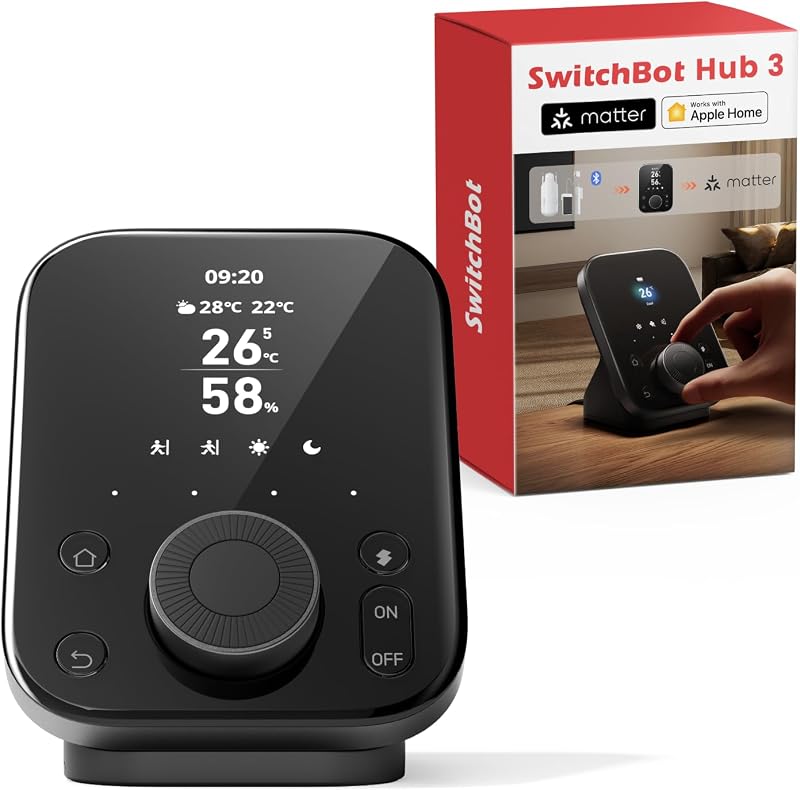
Smart home management often collapses under the weight of mobile app fatigue. Unlocking a phone, navigating through layered application menus, and waiting for digital widgets to refresh just to adjust room temperature or dim an overhead lamp creates needless friction for busy homeowners. Those who previously anchored their automation systems around hardware such as the Aeotec Smart Home Hub v3 frequently find themselves searching for a modern smartthings hub gen 3 alternative that merges immediate, tactile control with unified cross-platform bridging. The SwitchBot Hub 3 addresses this operational gap directly, presenting a dedicated tabletop command console built to eliminate app-switching delays.
Our short verdict is that this device excels for professionals seeking immediate physical control over localized room appliances without depending exclusively on voice assistants or smartphone screens. Serving as an environmental monitor, broad infrared transceiver, and Matter bridge, it unifies fragmented accessories into a cohesive workflow. While it skips traditional radio protocols like Zigbee and Z-Wave in favor of Matter and Bluetooth, its physical dial and vibrant display make it an outstanding desktop or bedside command post.
01 Quick Verdict
The SwitchBot Hub 3 delivers a targeted balance of physical interaction and modern smart home bridging, functioning as a practical nerve center for daily automations.
- Tactile Dial Master rotary knob enables precision adjustments for temperature and lighting without opening an app.
- Native Matter bridge capability allows proprietary SwitchBot accessories to communicate seamlessly with Apple HomeKit and other major ecosystems.
- High-precision onboard temperature and humidity sensor accurate to ±0.2°C provides reliable trigger data for climate automations.
- Extensive infrared database supporting over 100,000 appliances breathes automated life into legacy air conditioners, heaters, and televisions.
02 SwitchBot Hub 3 Features Explained
01 Dial Master Rotary Control and Tactile Interface
The standout physical element of this console is the Dial Master rotary control paired with four customizable physical buttons. In an era dominated by smooth glass touchscreens, physical rotation provides immediate tactile feedback that touch panels cannot replicate. Users can fine-tune air conditioning temperatures by single increments of 1°C or dial lighting brightness up and down with instant responsiveness. This interface is particularly advantageous for busy professionals who want to make quick adjustments mid-task without diverting attention to a smartphone display.
Beyond individual dials, the four customizable buttons allow users to store and execute routine commands or scenes instantly. Guests, children, and elderly family members can activate preconfigured room profiles, mute audio, or adjust cooling without needing permissions inside a mobile app. This tactile interface bridges the usability gap between technical smart homes and intuitive household appliances, making everyday operations frictionless.
02 Vivid IPS Screen and Environmental Monitoring
Visual status updates are anchored by an integrated IPS screen that delivers essential environmental and device metrics at a single glance. The switchbot hub 3 display presents a clean overview of real-time conditions, including localized weather updates with rain alerts, connected door lock security states with open-door warnings, carbon dioxide metrics, and broader indoor climate data. Placing this display on a workstation or nightstand keeps critical household metrics accessible without cluttering your computer monitor with additional browser dashboards.
Precision monitoring is driven by a built-in climate sensor that measures temperature and humidity with an accuracy tolerance of ±0.2°C. This level of calibration ensures that the numbers shown on the screen reflect actual living conditions rather than delayed estimates. For home offices where temperature shifts degrade comfort during long working hours, having an immediate, visible confirmation of climate data simplifies personal comfort management.
03 Matter Bridge Integration and Ecosystem Unification
Ecosystem fragmentation remains one of the largest obstacles in consumer automation, and the switchbot hub 3 matter bridge functionality serves as the platform’s primary interoperability engine. By translating local signals from Bluetooth accessories into standardized Matter protocols, the hub enables devices such as SwitchBot Curtain and BlindTilt units to appear natively inside Apple HomeKit, Google Home, and compatible platforms. This bridging eliminates the need to replace functional, specialized motors just to achieve cross-platform voice or dashboard control.
The listing outlines strict operational prerequisites for this bridging architecture, requiring a stable 2.4GHz Wi-Fi connection alongside an existing Matter controller such as an Apple HomePod, Apple TV, or compatible smart speaker on the same network subnet. While it does not incorporate native Zigbee or Z-Wave radios, its implementation of the Matter standard provides a forward-looking path for modernizing smart home architectures without being permanently locked into a single proprietary app.
04 Expansive Infrared Appliance Control
Legacy electronic appliances often remain isolated from automated ecosystems due to their reliance on traditional handheld remotes. The switchbot hub 3 ir remote transceiver bridges this divide by incorporating a comprehensive database that supports over 100,000 infrared appliances across air conditioners, televisions, projectors, and media centers. Instead of keeping a collection of plastic remotes across a desk or coffee table, users can map these signals directly to the console’s physical buttons or automated routines.
Because the hub operates locally within line of sight, command latency for infrared gear is virtually eliminated. Adjusting legacy cooling units through the rotary dial or having an air conditioner power off automatically when leaving the room modernizes older appliances without requiring expensive equipment upgrades. For offices outfitted with standalone mini-split air systems, this infrared integration offers an efficient method to achieve centralized climate scheduling.
05 Automated Scenes and Geofencing Triggers
Automations inside the ecosystem extend beyond manual inputs thanks to autonomous multi-sensor scene generation. Utilizing the switchbot hub 3 for home automation allows households to leverage ambient temperature, relative humidity, and detected light levels as conditional triggers. For instance, as direct sunlight increases during the afternoon and ambient warmth rises past a set threshold, the console can simultaneously trigger shades to close and initiate air conditioning cooling routines.
Geofencing capabilities expand these automated sequences to respond to user arrival and departure patterns. Devices can enter low-power standby modes, turn off infrared entertainment devices, and arm security alerts automatically when occupants leave the geofenced perimeter. Incorporating ambient light sensors alongside climate metrics ensures that lighting scenes activate based on actual room illumination rather than generic astronomical sunset clocks.
03 Specs
| Attribute | Detail |
|---|---|
| Brand | SwitchBot |
| Manufacturer | Wonderlabs |
| Model Number | W7202100 |
| Product Dimensions | 3.7 x 3.7 x 4.9 inches |
| Item Weight | 1.1 pounds |
| Display Type | Vivid IPS screen |
| Sensors | High-precision temperature and humidity (±0.2°C), light sensor |
| Wireless Connectivity | 2.4GHz Wi-Fi, Bluetooth (200m range) |
| Smart Standards | Matter Bridge, Infrared transceiver (100,000+ devices) |
| Physical Controls | Dial Master rotary control, 4 customizable buttons |
04 SwitchBot Hub 3 Pros and Cons
Pros
- Tactile rotary dial and four physical buttons
- Matter bridge expands HomeKit compatibility
- Controls over 100,000 infrared appliances
- High-precision climate sensor accurate to ±0.2°C
- Vivid IPS display tracks environmental metrics
Cons
- Requires 2.4GHz Wi-Fi network connection
- Listing does not specify power adapter inclusion
- No built-in Zigbee or Z-Wave radios listed
05 Best Use Cases
- Positioning on a professional workstation to monitor indoor climate metrics and manage office lighting through the smart home command center dial without touching a phone.
- Bridging Bluetooth-based SwitchBot curtain motors and blind tilt controllers directly into Apple HomeKit via the built-in Matter bridge architecture.
- Consolidating bedside nightstand clutter by replacing individual infrared television, fan, and air conditioner remotes with a single rotary control station.
- Establishing climate-driven automated routines that turn on cooling appliances whenever temperature thresholds exceed baseline comfort levels.
06 Before You Buy
Before integrating this unit into your home, network compatibility requires careful evaluation. The listing specifies that the device operates strictly across 2.4GHz Wi-Fi bands and will not connect over dedicated 5GHz networks. When configuring Matter bridge features for platforms like Apple HomeKit, your mobile setup device (such as an iPhone) and the home hub (such as an Apple TV or HomePod) must reside on that same local network. Households looking to deploy a broader multi-screen dashboard might also evaluate how a dedicated smart display like the Google Nest Hub 2nd Gen operates before choosing a physical dial console.
Prospective buyers should also note hardware boundaries outlined in the official product data. The listing details the physical dimensions as 3.7 x 3.7 x 4.9 inches and a weight of 1.1 pounds, but it does not specify whether a wall power adapter block or specific length of USB cable is bundled in the box. Furthermore, the listing does not specify native Zigbee or Z-Wave onboard antennas, nor does it mention a physical Ethernet port. If your existing setup depends entirely on legacy low-power mesh radios rather than Bluetooth or Matter, additional interface planning will be necessary.
07 How It Compares With Similar Picks
| Product | Best For | Key Difference |
|---|---|---|
| SwitchBot Hub 3 | Desk or bedside tactile control with Matter bridging | Features a physical Dial Master knob, IPS screen, ±0.2°C sensor, and infrared transmitter |
| Amazon Echo Hub | Wall-mounted central smart home dashboarding | Offers an 8-inch touchscreen display with Alexa+ integration for extensive smart home control |
| Home Assistant Green | Advanced, private local home automation setups | Operates as dedicated Home Assistant hardware focused on deep software automation without built-in screens |
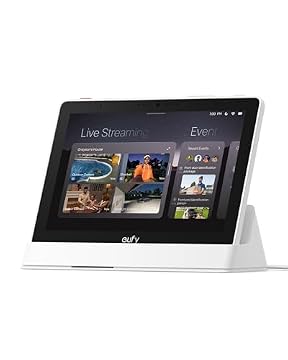
| Compatible Devices | Security monitoring and multi-camera event feeds | Features an 8-inch eufy control panel with 64GB EMMC storage, instant door alerts, and quad-view support |
Selecting an alternative depends on your primary architectural goal. If your objective is centralized wall mounting with deep voice assistant integration across extensive media layouts, the Amazon Echo Hub offers a broad 8-inch touchscreen surface. Users who demand locally processed, open-source automation scripts without proprietary boundaries will find stronger utility in reading our Home Assistant Green review to assess a non-display processing box. For multi-camera security feeds and onboard event storage, the eufy display panel remains the specialized pick, whereas the SwitchBot Hub 3 remains uniquely tailored for desktop ergonomics, climate sensing, and rotary tactile adjustments.

08 Bottom Line
The SwitchBot Hub 3 carves out a distinct niche in the desktop automation space by prioritizing tactile ergonomics over touchscreen menus. For professionals tired of unlocking mobile devices or dealing with latency on voice commands, the combination of a physical Dial Master rotary control and an accurate climate display delivers effortless micro-adjustments. Its dual functionality as an infrared blaster and a Matter bridge turns it into a practical workstation upgrade that consolidates disparate home hardware.
So, is switchbot hub 3 worth it for your setup? If your automation strategy emphasizes Bluetooth-enabled SwitchBot hardware, localized room comfort control, and cross-platform Matter access for Apple HomeKit, this console is an exceptionally practical investment. However, if your existing installation relies strictly on native Zigbee or Z-Wave mesh networks without external bridges, you will need to account for those protocol boundaries before making it the centerpiece of your smart home.
09 FAQ
How does the switchbot hub 3 setup process work on home networks?
The switchbot hub 3 setup relies on a 2.4GHz Wi-Fi connection and Bluetooth pairing through the companion mobile app. Before initiating setup, ensure your phone and existing Matter controllers (such as an Apple TV or HomePod) are operating on the same 2.4GHz network band to ensure successful synchronization.
Can the SwitchBot Hub 3 function as a smartthings hub gen 3 alternative?
It can serve as a functional alternative for users who want a central desktop console, infrared control, and Matter bridging to modern ecosystems. However, because the listing does not specify native Zigbee or Z-Wave radios, it cannot directly replace the mesh protocol antennas found in traditional SmartThings hardware without secondary bridges.
What appliances can be controlled with the switchbot hub 3 ir remote functionality?
The onboard infrared database contains command profiles for over 100,000 traditional appliances, including air conditioners, televisions, media players, and lighting systems, allowing you to control older hardware via the physical dial or automated scenes.
How does the switchbot hub 3 matter bridge handle non-Matter SwitchBot accessories?
The hub bridges compatible Bluetooth devices, such as the SwitchBot Curtain and BlindTilt, translating their signals into the standardized Matter protocol so they appear natively inside platforms like Apple HomeKit.
What environmental readings are tracked on the switchbot hub 3 display?
The IPS display provides real-time readouts for ambient indoor temperature and relative humidity measured by the ±0.2°C onboard sensor, ambient lighting conditions, external weather with rain notifications, carbon dioxide levels, and connected door lock states.
Dedicated physical controls prove that tactile hardware often outperforms touchscreen interfaces for rapid, nuanced adjustments across modern workspaces. Much like the rotary dials found in curated DJ Controller Picks, the Hub 3 brings muscle memory back to everyday desktop management. Swapping app menus for hardware knobs ultimately keeps your focus on your environment rather than your phone screen.