As Amazon Associates, we earn from qualifying purchases. This means we may receive a small commission at no extra cost to you if you click through and make a purchase.

Operating the anker make m5 at elevated printing speeds requires aggressive, synchronized thermal management right at the extrusion zone. When molten filament is deposited at accelerated travel rates, the plastic must solidify immediately upon exiting the nozzle to prevent severe sagging, dimensional distortion, and messy stringing. If your original printhead blower begins to rattle, drop in rotational velocity, or fail completely from mechanical wear, print consistency deteriorates instantly. The AnkerMake M5 Cooling Fan is the official OEM component designed specifically to restore factory-grade thermal dissipation and stabilize high-speed extrusion across intricate models.
For professionals and busy creators who rely on rapid fabrication turnarounds, a failing part-cooling blower creates unacceptable machine downtime and wastes expensive filament spools on aborted print jobs. Installing this factory-matched dual-fan assembly resolves thermal instability directly, reinstating the exact static pressure and airflow velocity specified by the manufacturer without requiring firmware adjustments or slicer alterations. This technical review breaks down the assembly specifications, aerodynamic design, and hardware details to help you determine if this replacement part fits your maintenance schedule.
01 Quick Verdict
The AnkerMake M5 Cooling Fan is a precise drop-in OEM replacement that restores the high-velocity directional airflow required for reliable high-speed printing. Spinning up to 16000 RPM to deliver 2.26 CFM of focused airflow, this dual 3010 fan design keeps carriage mass minimal at just 9.07 grams while ensuring symmetrical thermal dissipation across your extruded layers.
- Dual 3010 cooling fan design engineered for balanced, multi-angle nozzle airflow.
- High-velocity 16000 RPM motor generating 2.26 CFM of focused air movement.
- Ultralight 9.07-gram copper build that safeguards toolhead acceleration dynamics.
- Direct factory-spec match for effortless integration into the AnkerMake M5 carriage.
02 AnkerMake M5 Cooling Fan Features Explained
01 Dual 3010 Cooling Fan Architecture
The core challenge of high-speed 3D printing lies in delivering balanced, multidirectional cooling around the melt zone without producing turbulent dead spots. The ankermake m5 dual 3010 fan configuration overcomes this obstacle by distributing active air movement symmetrically around the nozzle tip. Traditional single-fan assemblies often exhibit cooling bias, where filament cools rapidly on the side facing the blower duct while remaining warm on the opposite flank, triggering uneven shrinkage and distorted perimeter lines. By utilizing two coordinated 3010 blowers, this unit directs balanced air streams around the entire circumference of the molten bead.
This dual-duct geometry proves vital when executing rapid toolhead directional reversals and tight perimeter loops. As the toolhead maneuvers around acute corners and thin external walls, the dual 3010 arrangement ensures uniform heat extraction regardless of which way the printhead travels. Eliminating directional thermal gradients stabilizes common thermoplastics like PLA and PETG, yielding crisp overhangs, flat bridges, and smooth surface finishes across demanding print geometries.
02 High-Velocity Airflow at 16000 RPM
Standard desktop 3D printer fans typically operate at modest speeds, which rapidly proves inadequate when setting up the ankermake m5 for high speed printing. This replacement module operates at an intense 16000 RPM, forcing 2.26 CFM of air through the compact toolhead ducting. This rapid displacement produces the static pressure needed to penetrate close to the molten extrusion pool the instant it exits the nozzle orifice, cooling the polymer below its glass transition temperature before structural drooping occurs.
In high-speed production environments, insufficient airflow leads to sagging bridges and rounded geometric corners. Generating 2.26 CFM from miniature fan housings requires high rotational velocity to overcome the internal resistance of tight duct channels. Whether you are fabricating mechanical brackets with long horizontal bridges or organic geometries with steep overhangs, the sustained airflow delivered by the 16000 RPM motor ensures structural bridges remain straight and unsupported perimeters retain their specified profile.
03 Lightweight Copper Build and Dynamic Balance
Weight control on an accelerated motion system is essential for preventing print artifacts such as ghosting, ringing, and layer stepping. Weighing just 9.07 grams, this cooling fan assembly adds negligible mass to the moving X-axis toolhead. The listing specifies copper material construction, which provides structural rigidity and long-term thermal resistance within the high-heat environment immediately adjacent to the heater block. Keeping carriage weight low allows your motion system to sustain aggressive acceleration profiles without introducing chassis vibrations.
Maintaining high-output maker spaces often involves managing multiple benchtop tools and peripherals alongside your fabrication hardware. Just as dependable 3D printing requires stable power and mechanical balance, keeping diagnostic gear powered with clean equipment like the anker prime 100w 3-port gan wall charger keeps your workspace efficient and organized. The durable copper build of this fan module resists heat fatigue and housing distortion, ensuring smooth rotational balance during lengthy print cycles.
04 Dedicated Model Cooling Capabilities
Distinguishing between heatsink cooling and active model cooling is critical when diagnosing extrusion errors. While a heatsink fan prevents thermal creep upward into the heat break, the model cooling fan is solely responsible for freezing the extruded plastic bead immediately after deposition. The robust ankermake m5 cooling capabilities supplied by this assembly focus strictly on part stabilization. By pulling thermal energy away from fresh layers, the component prevents heat buildup in delicate vertical pins and thin-walled features that would otherwise deform under radiant heat.
When tuning slicing profiles for rapid cycle times, layer cooling time is often the primary bottleneck restricting overall print speed. If a previous layer does not solidify completely before the nozzle returns to deposit the next layer, the entire vertical section turns into a softened, distorted mess. The targeted cooling from this assembly accelerates layer freeze times, allowing operators to reduce minimum layer cooling thresholds in software. This allows you to leverage the full mechanical speed of your printer without sacrificing structural accuracy or cosmetic clarity.
03 Specs
| Attribute | Detail |
|---|---|
| Brand Name | AnkerMake |
| Manufacturer | Anker |
| Model Number | V7114011 |
| Manufacturer Part Number | V7114011 |
| Fan Configuration | Dual 3010 Cooling Fan Design |
| Rotational Speed | 16000 RPM |
| Airflow Volume | 2.26 CFM |
| Item Weight | 9.07 g |
| Material | Copper |
| Color | Black |
| Package Quantity | 1 Count (1 Pack) |
| UPC | 194644151041 |
04 AnkerMake M5 Cooling Fan Pros and Cons
Pros
- Dual 3010 fan design for symmetrical cooling
- High 16000 RPM rotational motor speed
- Generates 2.26 CFM active airflow
- Ultralight 9.07-gram copper construction
- Exact OEM replacement for AnkerMake M5
Cons
- Listing does not include mounting screws
- Single unit pack requires separate reorders for spares
- Restricted specifically to model cooling functions
05 Best Use Cases
- Restoring factory model-cooling performance when the original toolhead fan develops bearing rattle or stops spinning during print cycles.
- Resolving chronic overhang curling, bridging droop, and stringing defects caused by degraded airflow at high print speeds.
- Stocking essential ankermake m5 replacement parts in commercial printing hubs to prevent unexpected production downtime.
- Performing planned preventative maintenance during comprehensive hotend rebuilds or major component overhauls.
06 Before You Buy
Before proceeding with an ankermake m5 fan replacement, confirm that your print defects originate from inadequate part cooling rather than hotend heat creep, incorrect nozzle temperatures, or bed leveling issues. This component carries manufacturer part number V7114011 and is designated specifically as the model cooling fan for the AnkerMake M5 carriage. However, the listing does not specify the inclusion of extra mounting screws, replacement fan ducts, or hex installation tools. You will need to retain and reuse your printer’s existing screws and bracket hardware during the swap, so avoid stripping fasteners during disassembly.
The product data specifies a single unit package (1 Count, 1 Pack) and does not specify compatibility with third-party toolheads or alternative printer frames. When working on sensitive toolhead electronics at your service desk, keeping portable power banks like the anker maggo power bank 2 pro nearby ensures your mobile testing instruments and inspection lights stay running without cluttering your main work area. Always ensure your 3D printer is completely powered down and disconnected from power before unplugging fan headers to prevent shorting the mainboard control circuitry.
07 How It Compares With Similar Picks
| Product | Best For | Key Difference |
|---|---|---|
| AnkerMake M5 Cooling Fan | Restoring OEM toolhead cooling on the AnkerMake M5 | Dedicated 9.07 g dual 3010 cooling fan running at 16000 RPM with 2.26 CFM airflow |
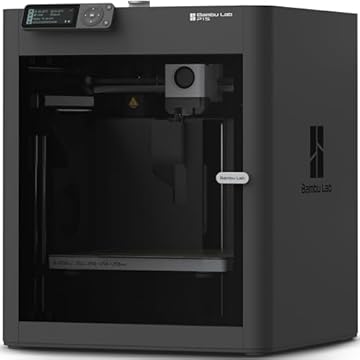
| MakerWorld Model Library | Multi-color high-speed printing with full enclosed setup | Complete CoreXY Bambu Lab P1S Combo 3D printer with AMS system and auto bed leveling |
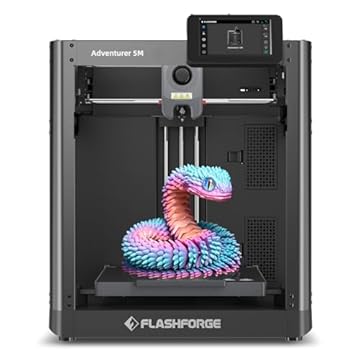
| FLASHFORGE Adventurer 5M 3D Printer | High-speed standalone CoreXY printing up to 600mm/s | Complete 3D printer featuring 220x220x220mm volume, 280°C direct extruder, and 3S detachable nozzle |
| Beginner-Friendly Ecosystem with MakerWorld Model | Enclosed CoreXY printing with an integrated model ecosystem | Standalone enclosed Bambu Lab P1S CoreXY printer integrated with the MakerWorld library |
Evaluating an individual replacement component against complete machines helps clarify whether you should repair your current setup or upgrade your hardware entirely. If your frame, stepper motors, and logic board remain in excellent working order, replacing a worn blower with the official fan restores factory-level print quality immediately without substantial expense. However, if your production needs have expanded to require multi-material capabilities in an enclosed chamber, complete setups like the MakerWorld Model Library bundle or the Beginner-Friendly Ecosystem with MakerWorld Model offer enclosed CoreXY architectures with AMS multi-color integration. Alternatively, the FLASHFORGE Adventurer 5M 3D Printer provides a self-contained high-speed machine with auto bed leveling and a quick-swap nozzle system for operations requiring additional standalone throughput.

08 Bottom Line
When high-speed print quality degrades on your AnkerMake machine, installing an authentic replacement model cooling fan is one of the most effective ways to restore precision. The AnkerMake M5 Cooling Fan delivers the rotational speed, airflow volume, and featherweight profile needed to keep fine details sharp and overhangs stable. It reinstates the targeted cooling performance your slicer profiles depend on without forcing you to engineer custom duct mounts or splice non-standard wiring.
For workshop operators who maintain tidy, high-efficiency production benches powered by versatile accessories like the anker prime power bank base, keeping essential hardware components in top shape prevents expensive downtime. As an authentic OEM replacement part, this dual 3010 fan assembly preserves the original machine design and gets your rapid fabrication back on track with minimal installation effort.
09 FAQ
What are the official ankermake m5 specs for this replacement fan?
The official ankermake m5 specs for this model cooling fan include a dual 3010 fan design running at 16000 RPM, delivering 2.26 CFM of focused airflow. The component features copper construction, weighs 9.07 grams, comes in black, and carries manufacturer part number V7114011.
How does the ankermake m5 dual 3010 fan prevent print defects during high-speed printing?
The dual 3010 fan assembly blows air evenly from two opposite sides of the hotend nozzle. This balanced airflow solidifies extruded filament immediately as it leaves the nozzle tip, preventing asymmetric curling, sagging overhangs, and bridging droop during rapid acceleration passes.
Is ankermake m5 fan replacement difficult to perform?
Performing an ankermake m5 fan replacement is straightforward because it is an exact OEM drop-in component matching the original toolhead specifications. You only need to disassemble the toolhead casing, unplug the old fan connector, secure the new assembly using your original screws, and plug the connector back into the control board.
Does this cooling fan listing include mounting screws or extra wiring?
The product listing specifies one cooling fan unit (1 Count, 1 Pack) and does not specify the inclusion of extra mounting screws, replacement wiring harnesses, or hex tools. Users should carefully retain and reuse all original mounting hardware from their existing toolhead during the replacement process.
Is ankermake m5 worth it to maintain with OEM replacement components?
Maintaining the printer with authentic replacement parts is worth it for operators who rely on fast turnaround times and high-speed extrusion. Replacing a worn part cooling fan preserves the printer’s core speed advantages and fine detail resolution at a fraction of the cost of replacing the entire toolhead or printer.